


Self-hosted GitHub Actions runners can make CI dramatically faster: builds run close to Amazon ECR, private package registries, test databases, and deployment targets. But a long-lived build server is also a long-lived place for credentials, source code, caches, and an attacker to hide.
The design in this guide avoids that trap. GitHub Actions Runner Controller (ARC) creates one ephemeral runner Pod for each job on Amazon EKS. Karpenter supplies EC2 capacity when the queue grows, GitHub OIDC issues short-lived AWS credentials, and strict trust boundaries prevent unreviewed pull requests from reaching privileged infrastructure.
What we are building
Our example repository is acme/payments-api. A GitHub Actions job targeting aws-eks-runners is picked up by an ARC listener. ARC creates a fresh runner Pod in the arc-runners namespace, the job executes once, and the Pod is deleted. Karpenter provisions dedicated nodes in private subnets and consolidates them after demand disappears.
The important boundaries are:
- ARC’s controller runs in
arc-systems; runners run inarc-runners. - Runner nodes are tainted and contain no application workloads.
- The scale set is restricted through the
production-cirunner group. - AWS access comes from OIDC and a branch- or environment-scoped IAM role—not access keys.
- Pull requests from forks never execute privileged code on this runner pool.
GitHub recommends ephemeral runners for autoscaling because each runner accepts exactly one job. It also recommends isolating production workloads from runner workloads because a workflow is arbitrary code.
Prerequisites
You need an EKS cluster, kubectl, Helm 3, AWS CLI v2, Karpenter, and organization-owner access in GitHub. The examples use cluster ci-runners-prod in eu-west-1.
Confirm your local context before changing anything:
aws eks update-kubeconfig --name ci-runners-prod --region eu-west-1
kubectl config current-context
kubectl get nodes
helm version
Create separate namespaces for the controller and runner Pods:
kubectl create namespace arc-systems
kubectl create namespace arc-runners
Register a GitHub App for ARC
At organization level, create a GitHub App for ARC. Give it Organization permissions of Self-hosted runners: Read and write and Repository permissions of Administration: Read and write only when repository-level registration requires it. Install it only on the organization or repositories that the scale set serves.
Record the App ID and installation ID, then download its private key. Put the resulting Kubernetes Secret in the runner namespace; do not put the PEM in Helm values or source control.
kubectl -n arc-runners create secret generic arc-github-app \
  --from-literal=github_app_id='123456' \
  --from-literal=github_app_installation_id='654321' \
  --from-file=github_app_private_key='./acme-arc.private-key.pem'
For a real platform, sync this Secret from AWS Secrets Manager with External Secrets Operator and rotate the private key on a schedule.
Install Actions Runner Controller
Install the ARC controller from GitHub’s OCI Helm registry. Pin a tested chart version in production rather than silently taking a new release.
helm upgrade --install arc \
  --namespace arc-systems \
  oci://ghcr.io/actions/actions-runner-controller-charts/gha-runner-scale-set-controller
Wait for the controller to become ready:
kubectl -n arc-systems rollout status \
  deployment/arc-gha-rs-controller --timeout=180s
kubectl -n arc-systems get pods
Configure the runner scale set
The runner values below keep two warm runners for low queue latency and cap concurrency at 30. Runner Pods request enough CPU and memory for ordinary builds, tolerate only the CI node taint, and select the dedicated Karpenter NodePool.
# arc-runners-values.yaml
githubConfigUrl: https://github.com/acme
githubConfigSecret: arc-github-app

runnerScaleSetName: aws-eks-runners
runnerGroup: production-ci
minRunners: 2
maxRunners: 30

template:
  spec:
    serviceAccountName: github-actions-runner
    nodeSelector:
      workload: github-actions
    tolerations:
      - key: ci.acme.io/runner
        operator: Equal
        value: "true"
        effect: NoSchedule
    containers:
      - name: runner
        image: ghcr.io/actions/actions-runner:latest
        command: ["/home/runner/run.sh"]
        resources:
          requests:
            cpu: "2"
            memory: 4Gi
          limits:
            cpu: "4"
            memory: 8Gi
Install it into the separate namespace:
helm upgrade --install aws-eks-runners \
  --namespace arc-runners \
  -f arc-runners-values.yaml \
  oci://ghcr.io/actions/actions-runner-controller-charts/gha-runner-scale-set
Check the Helm releases and listener:
helm list -A
kubectl -n arc-runners get autoscalingrunnersets
kubectl -n arc-runners get pods -w
The scale set should appear online in GitHub under Organization settings → Actions → Runners. The installation name becomes the value used by runs-on.
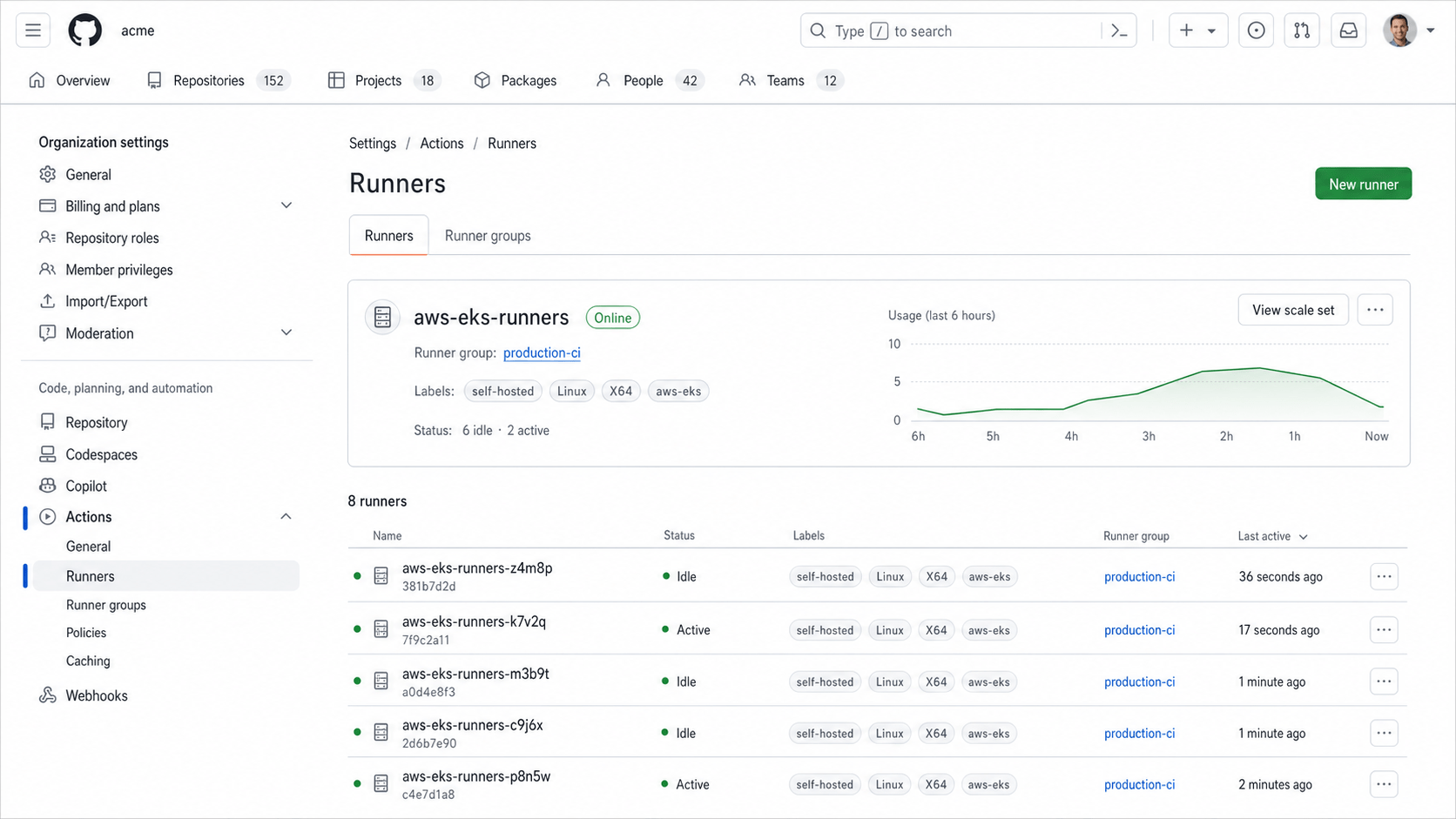
GitHub Actions shows the aws-eks-runners scale set online, with six idle runners and two active jobs in the production-ci runner group.
Add an isolated Karpenter NodePool
Runners should not share nodes with customer-facing workloads. The NodePool below uses current karpenter.sh/v1 APIs, applies a hard taint, accepts both Spot and On-Demand capacity, and gives Karpenter several CPU families to choose from.
apiVersion: karpenter.sh/v1
kind: NodePool
metadata:
  name: github-actions
spec:
  template:
    metadata:
      labels:
        workload: github-actions
    spec:
      nodeClassRef:
        group: karpenter.k8s.aws
        kind: EC2NodeClass
        name: github-actions
      taints:
        - key: ci.acme.io/runner
          value: "true"
          effect: NoSchedule
      requirements:
        - key: kubernetes.io/arch
          operator: In
          values: ["amd64"]
        - key: karpenter.sh/capacity-type
          operator: In
          values: ["spot", "on-demand"]
        - key: karpenter.k8s.aws/instance-category
          operator: In
          values: ["c", "m", "r"]
        - key: karpenter.k8s.aws/instance-generation
          operator: Gt
          values: ["5"]
      expireAfter: 168h
  limits:
    cpu: "200"
  disruption:
    consolidationPolicy: WhenEmptyOrUnderutilized
    consolidateAfter: 2m
The EC2NodeClass selects private subnets and runner-specific security groups using discovery tags. It also encrypts the root disk and enforces IMDSv2.
apiVersion: karpenter.k8s.aws/v1
kind: EC2NodeClass
metadata:
  name: github-actions
spec:
  role: KarpenterNodeRole-ci-runners-prod
  amiSelectorTerms:
    - alias: al2023@latest
  subnetSelectorTerms:
    - tags:
        karpenter.sh/discovery: ci-runners-prod
        network.acme.io/tier: private
  securityGroupSelectorTerms:
    - tags:
        karpenter.sh/discovery: ci-runners-prod
  metadataOptions:
    httpEndpoint: enabled
    httpProtocolIPv6: disabled
    httpPutResponseHopLimit: 1
    httpTokens: required
  blockDeviceMappings:
    - deviceName: /dev/xvda
      ebs:
        volumeSize: 80Gi
        volumeType: gp3
        encrypted: true
        deleteOnTermination: true
Apply both resources and confirm readiness:
kubectl apply -f github-actions-nodepool.yaml
kubectl get nodepool github-actions
kubectl get ec2nodeclass github-actions
Use OIDC instead of AWS access keys
The runner itself does not need broad AWS credentials. A workflow asks GitHub for a signed OIDC token, and AWS STS exchanges it for a short-lived role session. The trust policy must constrain both aud and sub.
This example permits only the protected production GitHub environment in acme/payments-api:
{
  "Version": "2012-10-17",
  "Statement": [{
    "Effect": "Allow",
    "Principal": {
      "Federated": "arn:aws:iam::123456789012:oidc-provider/token.actions.githubusercontent.com"
    },
    "Action": "sts:AssumeRoleWithWebIdentity",
    "Condition": {
      "StringEquals": {
        "token.actions.githubusercontent.com:aud": "sts.amazonaws.com",
        "token.actions.githubusercontent.com:sub": "repo:acme/payments-api:environment:production"
      }
    }
  }]
}
Attach a least-privilege policy. A build role might push only to one ECR repository; a deployment role should be separate and protected by environment approval.
{
  "Version": "2012-10-17",
  "Statement": [{
    "Effect": "Allow",
    "Action": [
      "ecr:GetAuthorizationToken"
    ],
    "Resource": "*"
  }, {
    "Effect": "Allow",
    "Action": [
      "ecr:BatchCheckLayerAvailability",
      "ecr:CompleteLayerUpload",
      "ecr:InitiateLayerUpload",
      "ecr:PutImage",
      "ecr:UploadLayerPart"
    ],
    "Resource": "arn:aws:ecr:eu-west-1:123456789012:repository/payments-api"
  }]
}
Build the workflow
Start every workflow with minimal token permissions. Grant id-token: write only to the job that exchanges the OIDC token, and pin third-party actions to full commit SHAs in production.
name: CI / Build and Deploy

on:
  pull_request:
  push:
    branches: [main]

permissions:
  contents: read

jobs:
  test:
    runs-on: aws-eks-runners
    steps:
      - uses: actions/checkout@v4
        with:
          persist-credentials: false
      - uses: actions/setup-node@v4
        with:
          node-version: 22
          cache: npm
      - run: npm ci --ignore-scripts
      - run: npm test
Keep cloud authentication in a separate build job and run it only for trusted refs:
  build-and-push:
    if: github.event_name == 'push' && github.ref == 'refs/heads/main'
    needs: test
    runs-on: aws-eks-runners
    environment: production
    permissions:
      contents: read
      id-token: write
    steps:
      - uses: actions/checkout@v4
        with:
          persist-credentials: false
      - uses: aws-actions/configure-aws-credentials@v4
        with:
          role-to-assume: arn:aws:iam::123456789012:role/github-payments-build
          aws-region: eu-west-1
      - uses: aws-actions/amazon-ecr-login@v2
        id: ecr
      - uses: docker/setup-buildx-action@v3
      - uses: docker/build-push-action@v6
        with:
          context: .
          push: true
          tags: ${{ steps.ecr.outputs.registry }}/payments-api:${{ github.sha }}
          cache-from: type=gha,scope=payments-api
          cache-to: type=gha,mode=max,scope=payments-api
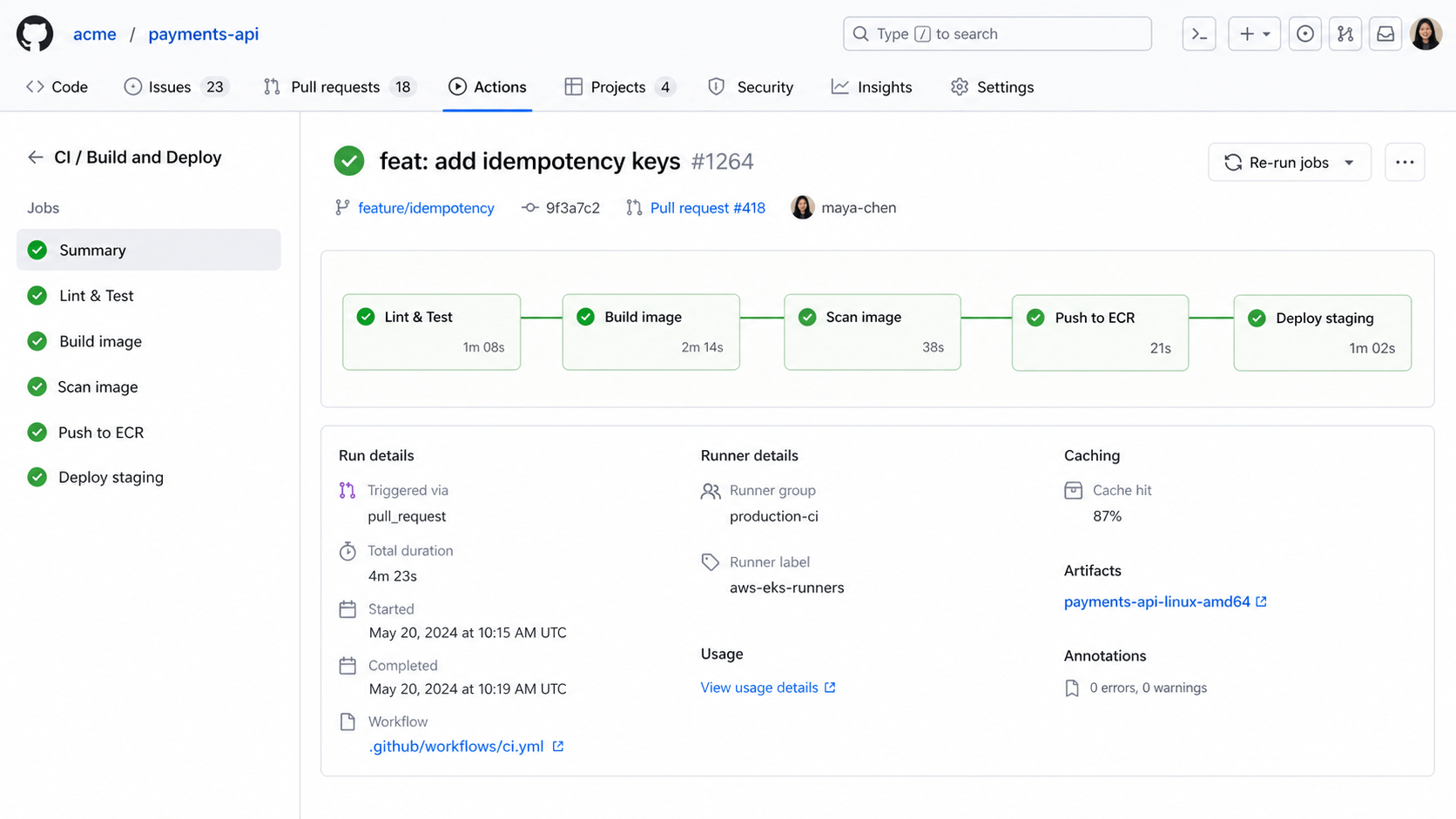
The workflow completed on the production-ci runner group, including image scanning, an ECR push, and staging deployment.
Choose a container-build mode deliberately
ARC supports Docker-in-Docker and Kubernetes container modes. DinD is familiar, but its daemon normally requires privileged access. Treat that runner pool as trusted infrastructure, isolate its nodes and network, and never route arbitrary fork code to it.
For stronger boundaries, use ARC’s Kubernetes mode so job containers are separate Pods. It requires each workflow job to declare a container unless you weaken the default guardrail.
containerMode:
  type: kubernetes
  kubernetesModeWorkVolumeClaim:
    accessModes: ["ReadWriteOnce"]
    storageClassName: gp3
    resources:
      requests:
        storage: 20Gi
If your pipeline needs ordinary Dockerfiles without privileged DinD, consider a rootless BuildKit image and export cache layers to ECR or GitHub Actions cache. Benchmark your own workload; cached dependency installation often matters more than raw CPU.
Keep untrusted pull requests away from privileged runners
Self-hosted runners should be assumed reachable by whatever code a workflow executes. A malicious fork can read the workspace, probe the network, consume compute, or attack a privileged Docker daemon.
Use this two-lane design:
- Fork pull requests run linting and unit tests on GitHub-hosted runners with no secrets.
- Trusted branch pushes or manually approved environments use
aws-eks-runners. - Never use
pull_request_targetto check out and execute an untrusted pull request head. - Restrict the runner group to selected repositories and require CODEOWNERS review for workflow changes.
A simple routing expression makes the public lane explicit:
runs-on: ${{
  github.event_name == 'pull_request' &&
  github.event.pull_request.head.repo.fork &&
  'ubuntu-latest' || 'aws-eks-runners'
}}
For high assurance, use separate workflow files and repository rulesets rather than relying only on a compact expression.
Network and cluster hardening
Place runner nodes in private subnets. Permit outbound HTTPS only to the GitHub endpoints ARC and runners require, plus approved registries and package mirrors. Add VPC endpoints for ECR API, ECR Docker, S3, CloudWatch Logs, and STS where practical. Do not expose runner Pods through a Service or public load balancer.
Apply a default-deny NetworkPolicy, then allow DNS and explicitly required destinations through your chosen egress control.
apiVersion: networking.k8s.io/v1
kind: NetworkPolicy
metadata:
  name: runner-default-deny
  namespace: arc-runners
spec:
  podSelector: {}
  policyTypes: [Ingress, Egress]
  ingress: []
  egress: []
Use Pod Security Admission, a restricted runner service account, read-only access wherever possible, and admission rules that reject host networking, host PID, hostPath volumes, and unexpected privileged containers. Kubernetes mode requires carefully scoped permissions to create job Pods; keep those permissions namespace-local.
Observe queue time, startup time, and failures
Job duration alone does not tell you whether the platform is fast. Track:
- queued-to-assigned latency in GitHub;
- runner Pod pending and image-pull time;
- Karpenter NodeClaim launch time and Spot interruption rate;
- active, idle, and failed runner counts;
- controller, listener, and ephemeral-runner logs;
- ECR cache hit rate and bytes transferred.
GitHub explicitly recommends forwarding ephemeral-runner logs to external storage. Send container logs to CloudWatch or your central log platform before Pods disappear.
kubectl -n arc-runners get pods -o wide
kubectl -n arc-runners logs -l \
  actions.github.com/scale-set-name=aws-eks-runners \
  --all-containers --prefix
kubectl get nodeclaims
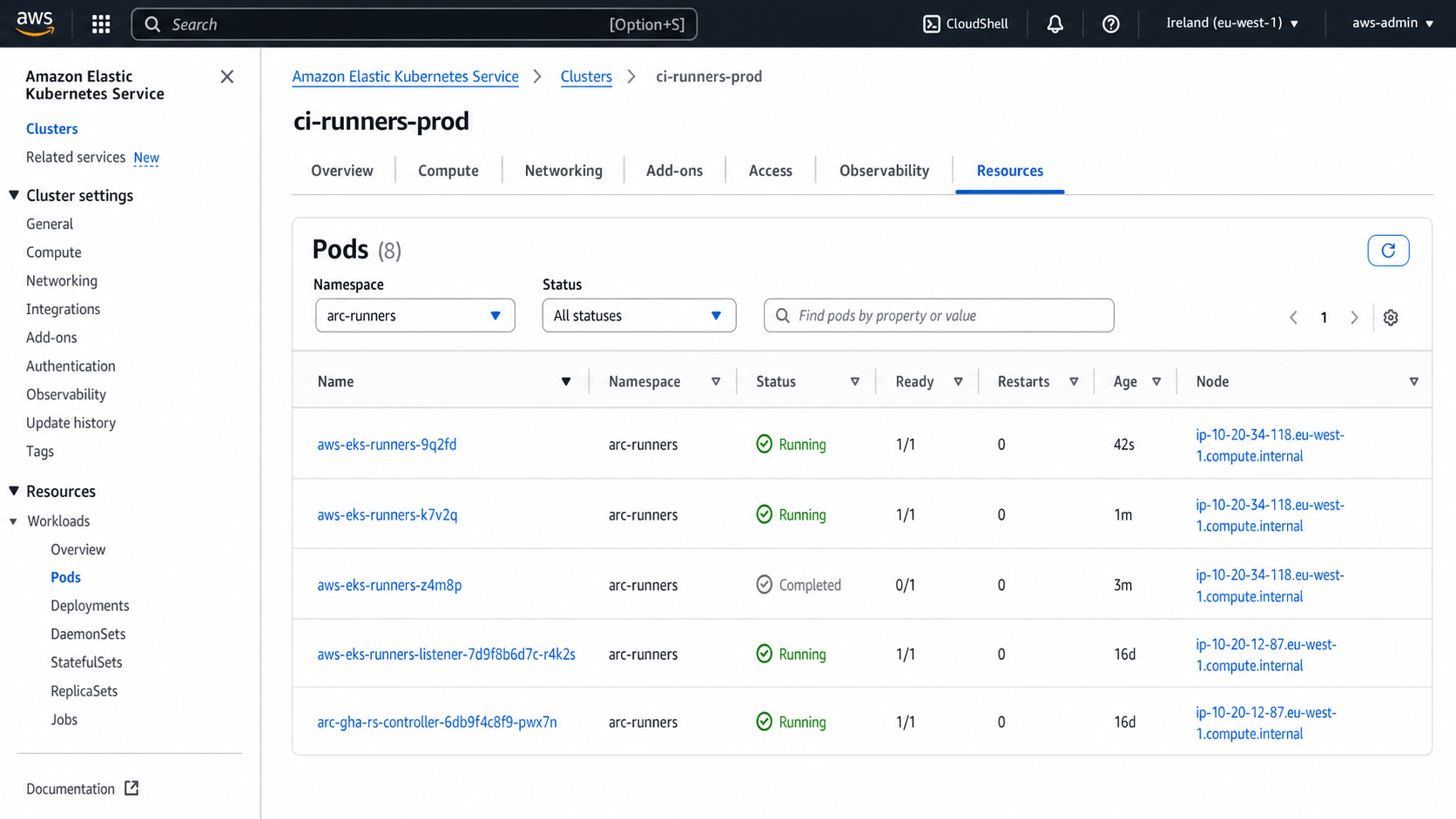
Amazon EKS shows active, completed, and listener Pods in arc-runners, with workload Pods scheduled onto private EC2 nodes.
Tune for speed without wasting money
Set minRunners from your latency objective, not guesswork. Zero warm runners is cheapest but every burst may wait for both a Pod and an EC2 node. Two warm runners absorb normal traffic; Karpenter handles spikes. Keep a small On-Demand fallback so a Spot shortage does not stop releases.
Build a versioned runner image containing stable tools such as git, language runtimes, scanners, and the AWS CLI. Pull it from ECR in the same region. Do not bake repository secrets into the image, and rebuild it frequently for security updates.
Inspect scaling after a test burst:
kubectl -n arc-runners get pods --sort-by=.metadata.creationTimestamp
kubectl get nodes -l workload=github-actions
kubectl describe nodepool github-actions
Use concurrency controls to cancel stale builds when a pull request receives new commits:
concurrency:
  group: ci-${{ github.workflow }}-${{ github.ref }}
  cancel-in-progress: true
Production checklist
- ARC and runner scale-set chart versions are pinned and tested in staging.
- Every runner is ephemeral and handles one job.
- Controller and runners use separate namespaces.
- Dedicated nodes have taints, encrypted disks, IMDSv2, and private networking.
- GitHub App credentials live in a secret manager and rotate.
- AWS roles use OIDC with exact repository, branch, or environment subjects.
- Fork code runs on a non-privileged lane with no secrets.
- Workflow permissions are minimal and actions are SHA-pinned.
- Runner logs survive Pod deletion.
minRunners,maxRunners, NodePool limits, and budgets have alerts.
Final thoughts
Fast and safe are not competing goals when the runner is disposable. ARC provides queue-aware ephemeral Pods, EKS provides the isolation boundary, Karpenter supplies elastic capacity, and OIDC removes long-lived AWS keys. The result is a CI/CD platform that starts close to the services it needs, scales with demand, and throws away the execution environment after every job.
The key is to design trust before tuning speed. Separate untrusted pull requests, keep cloud roles narrow, isolate runner nodes, and retain audit logs. Once those controls are in place, warm capacity and aggressive caching can make the developer experience genuinely fast without turning CI into a permanent foothold.


Leave a Comment
Your email address will not be published. Required fields are marked with *