


Code review is much easier when reviewers can use the change instead of reconstructing it from a diff. An ephemeral preview environment gives every selected pull request its own URL, Kubernetes namespace, immutable container image, application configuration, and teardown lifecycle.
The useful word is ephemeral. A preview environment should appear without a ticket, update when the pull request changes, and disappear when the pull request closes. If engineers must remember to create or delete it, the platform will eventually fill with forgotten namespaces.
This guide builds that workflow with:
- GitHub Actions for tests, image creation, and pull-request feedback.
- GitHub Container Registry (GHCR) for immutable images.
- Argo CD ApplicationSet’s Pull Request generator for environment discovery.
- A trusted Helm chart for the Kubernetes resources.
- One isolated namespace and URL per pull request.
- Automatic cleanup when the pull request closes or loses its
previewlabel.
What happens after a developer opens a pull request?
The control loop is intentionally split between CI and GitOps:
- A maintainer adds the
previewlabel to pull request#184. - GitHub Actions tests the commit and pushes
ghcr.io/acme/shop-web:sha-7c91a6b. - Argo CD’s ApplicationSet controller discovers the labelled pull request.
- It generates an Application named
preview-pr-184from a trusted platform repository. - Helm renders a Namespace, ResourceQuota, Deployment, Service, and Ingress.
- The preview becomes available at
https://pr-184.preview.acme.dev. - CI runs a smoke test and updates one persistent comment on the pull request.
- Closing the pull request removes the generated Application and its managed resources.
CI builds the artifact; Argo CD owns deployment state. CI never needs broad Kubernetes credentials.
Prerequisites
You need:
kubectl version --client
helm version
argocd version --client
gh --version
The cluster should already have Argo CD, the ApplicationSet controller, an Ingress controller, and a DNS record such as *.preview.acme.dev pointing to the Ingress load balancer. Configure a wildcard certificate as the Ingress controller’s default certificate or automate certificates with cert-manager.
The example uses two repositories:
acme/shop-web         # application code and pull requests
acme/platform-config  # trusted Helm chart and ApplicationSet
Keeping the deployment chart in a protected platform repository is a security boundary. A contributor can change application code, but cannot change the preview ServiceAccount, RBAC rules, host path, or cluster-scoped resources from an untrusted pull request.
1. Build one immutable image per commit
Create .github/workflows/preview.yml in the application repository:
name: Preview environment

on:
  pull_request:
    types: [opened, synchronize, reopened, labeled, unlabeled]

concurrency:
  group: preview-${{ github.event.pull_request.number }}
  cancel-in-progress: true

permissions:
  contents: read
  packages: write
  pull-requests: write

jobs:
  build-image:
    if: >-
      github.event.pull_request.head.repo.full_name == github.repository &&
      contains(github.event.pull_request.labels.*.name, 'preview')
    runs-on: ubuntu-latest
    env:
      IMAGE: ghcr.io/${{ github.repository }}
      TAG: sha-${{ github.event.pull_request.head.sha }}

    steps:
      - name: Check out pull request commit
        uses: actions/checkout@v6
        with:
          ref: ${{ github.event.pull_request.head.sha }}

      - name: Run tests
        run: ./scripts/test.sh

      - name: Set up Buildx
        uses: docker/setup-buildx-action@v3

      - name: Log in to GHCR
        uses: docker/login-action@v3
        with:
          registry: ghcr.io
          username: ${{ github.actor }}
          password: ${{ secrets.GITHUB_TOKEN }}

      - name: Build and push
        uses: docker/build-push-action@v6
        with:
          context: .
          push: true
          tags: ${{ env.IMAGE }}:${{ env.TAG }}
          cache-from: type=gha
          cache-to: type=gha,mode=max
          provenance: true
The full commit SHA makes the tag immutable and traceable. Avoid a mutable tag such as pr-184: Kubernetes may keep the old image, and an audit trail can no longer prove which commit ran.
The same-repository condition is deliberate. Workflows from forks normally receive a read-only token and no repository secrets. Never solve that by casually switching to pull_request_target and checking out untrusted code with privileged credentials.
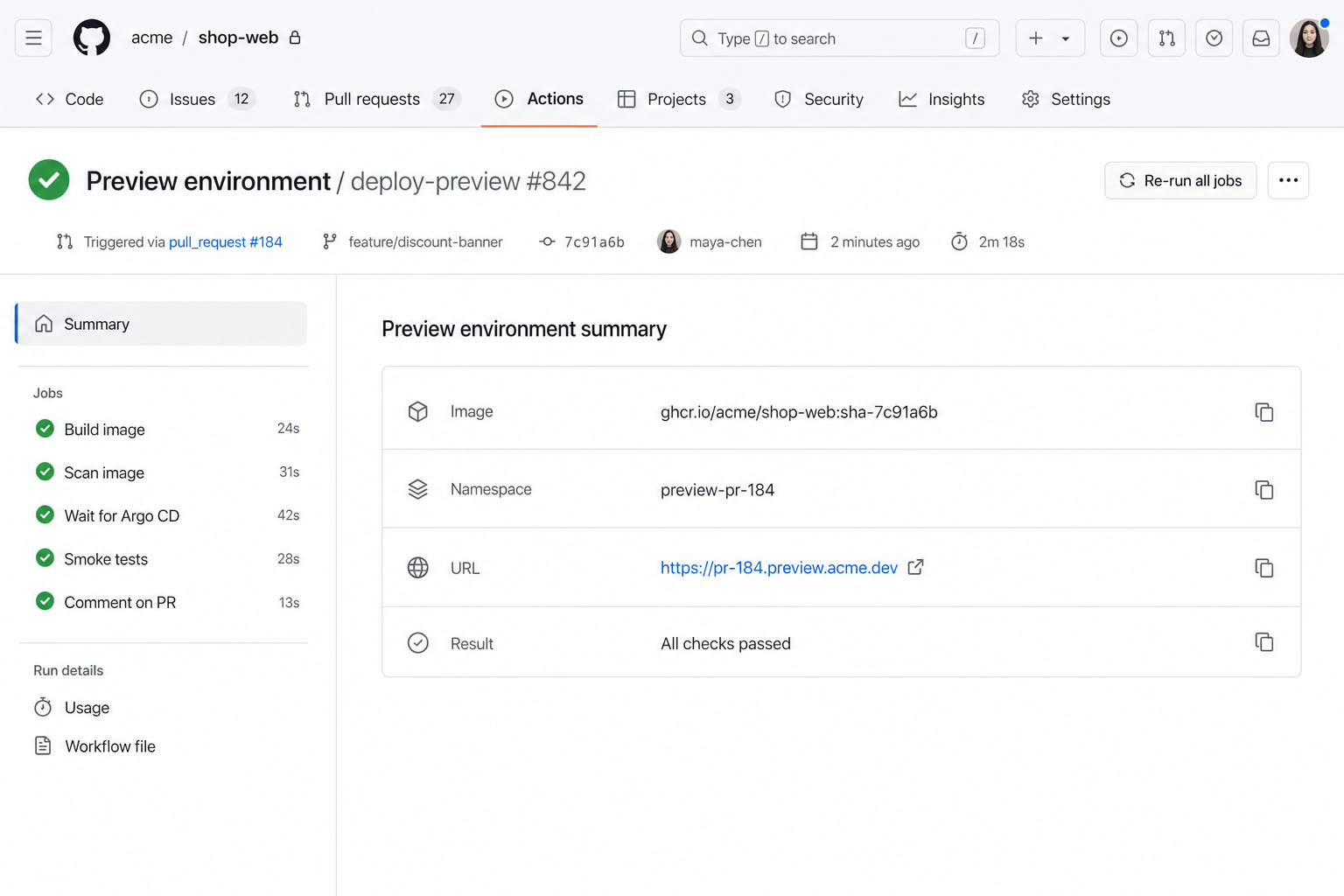
The workflow run ties the image, namespace, URL, jobs, commit, and pull request together.
2. Give Argo CD read-only access to pull requests
The ApplicationSet controller must query GitHub. Prefer a GitHub App with access only to pull requests and metadata for the application repository. Argo CD can reference the App credential as a repository-credential Secret:
apiVersion: v1
kind: Secret
metadata:
  name: argocd-github-app
  namespace: argocd
  labels:
    argocd.argoproj.io/secret-type: repo-creds
stringData:
  type: git
  url: https://github.com/acme
  githubAppID: "123456"
  githubAppInstallationID: "7890123"
  githubAppPrivateKey: |
    -----BEGIN PRIVATE KEY-----
    REPLACE_WITH_PRIVATE_KEY
    -----END PRIVATE KEY-----
Store the real private key through External Secrets, Sealed Secrets, SOPS, or another approved secret-delivery mechanism. Do not commit it to Git.
3. Constrain previews with an Argo CD project
Create a dedicated AppProject so preview Applications can use only the trusted chart repository and preview-pr-* namespaces:
apiVersion: argoproj.io/v1alpha1
kind: AppProject
metadata:
  name: preview
  namespace: argocd
spec:
  description: Ephemeral pull-request environments
  sourceRepos:
    - https://github.com/acme/platform-config.git
  destinations:
    - server: https://kubernetes.default.svc
      namespace: preview-pr-*
  clusterResourceWhitelist:
    - group: ""
      kind: Namespace
  namespaceResourceWhitelist:
    - group: "*"
      kind: "*"
  orphanedResources:
    warn: true
Use a separate preview cluster when previews need risky integrations, accept traffic from outside the company, or execute arbitrary customer code. A namespace is a useful boundary, but it is not equivalent to a cluster security boundary.
4. Create the trusted preview Helm chart
The chart accepts only the values that vary per pull request:
# charts/shop-preview/values.yaml
preview:
  number: "0"
  namespace: preview-pr-0
  host: pr-0.preview.acme.dev

image:
  repository: ghcr.io/acme/shop-web
  tag: sha-placeholder
  pullPolicy: IfNotPresent

resources:
  requests:
    cpu: 100m
    memory: 128Mi
  limits:
    cpu: 500m
    memory: 512Mi
Make the namespace a managed Helm resource so it participates in cleanup:
apiVersion: v1
kind: Namespace
metadata:
  name: {{ .Values.preview.namespace }}
  labels:
    environment: preview
    pull-request: {{ .Values.preview.number | quote }}
    pod-security.kubernetes.io/enforce: restricted
  annotations:
    argocd.argoproj.io/sync-wave: "-2"
Apply a namespace budget before the workload starts:
apiVersion: v1
kind: ResourceQuota
metadata:
  name: preview-budget
  namespace: {{ .Values.preview.namespace }}
  annotations:
    argocd.argoproj.io/sync-wave: "-1"
spec:
  hard:
    requests.cpu: "2"
    requests.memory: 4Gi
    limits.cpu: "4"
    limits.memory: 8Gi
    pods: "20"
    services: "10"
    persistentvolumeclaims: "4"
Add a LimitRange so an omitted request cannot create an unbounded container:
apiVersion: v1
kind: LimitRange
metadata:
  name: preview-defaults
  namespace: {{ .Values.preview.namespace }}
spec:
  limits:
    - type: Container
      defaultRequest:
        cpu: 100m
        memory: 128Mi
      default:
        cpu: 500m
        memory: 512Mi
The application resources use the generated hostname and immutable image:
apiVersion: apps/v1
kind: Deployment
metadata:
  name: shop-web
  namespace: {{ .Values.preview.namespace }}
spec:
  replicas: 1
  selector:
    matchLabels:
      app: shop-web
  template:
    metadata:
      labels:
        app: shop-web
    spec:
      automountServiceAccountToken: false
      containers:
        - name: shop-web
          image: "{{ .Values.image.repository }}:{{ .Values.image.tag }}"
          ports:
            - name: http
              containerPort: 8080
          readinessProbe:
            httpGet:
              path: /readyz
              port: http
            initialDelaySeconds: 3
            periodSeconds: 5
          resources:
            {{- toYaml .Values.resources | nindent 12 }}
apiVersion: networking.k8s.io/v1
kind: Ingress
metadata:
  name: shop-web
  namespace: {{ .Values.preview.namespace }}
spec:
  ingressClassName: nginx
  tls:
    - hosts:
        - {{ .Values.preview.host }}
  rules:
    - host: {{ .Values.preview.host }}
      http:
        paths:
          - path: /
            pathType: Prefix
            backend:
              service:
                name: shop-web
                port:
                  number: 80
5. Generate one Argo CD Application per labelled PR
The Pull Request generator supplies values including number, branch, head_sha, and head_short_sha. This ApplicationSet selects only open pull requests carrying the preview label:
apiVersion: argoproj.io/v1alpha1
kind: ApplicationSet
metadata:
  name: shop-previews
  namespace: argocd
spec:
  goTemplate: true
  goTemplateOptions: ["missingkey=error"]

  generators:
    - pullRequest:
        github:
          owner: acme
          repo: shop-web
          appSecretName: argocd-github-app
          labels:
            - preview
        requeueAfterSeconds: 60

  template:
    metadata:
      name: 'preview-pr-{{ .number }}'
      finalizers:
        - resources-finalizer.argocd.argoproj.io
      labels:
        environment: preview
        pull-request: '{{ .number }}'
    spec:
      project: preview
      source:
        repoURL: https://github.com/acme/platform-config.git
        targetRevision: main
        path: charts/shop-preview
        helm:
          parameters:
            - name: preview.number
              value: '{{ .number }}'
            - name: preview.namespace
              value: 'preview-pr-{{ .number }}'
            - name: preview.host
              value: 'pr-{{ .number }}.preview.acme.dev'
            - name: image.tag
              value: 'sha-{{ .head_sha }}'
      destination:
        server: https://kubernetes.default.svc
        namespace: 'preview-pr-{{ .number }}'
      syncPolicy:
        automated:
          prune: true
          selfHeal: true
        syncOptions:
          - CreateNamespace=true
          - PrunePropagationPolicy=foreground

  syncPolicy:
    preserveResourcesOnDeletion: false
Apply the platform resources:
kubectl apply -f appproject-preview.yaml
kubectl apply -f shop-previews-applicationset.yaml

kubectl get applicationset shop-previews -n argocd
kubectl get applications -n argocd -l environment=preview
For faster response than polling, expose the ApplicationSet webhook server securely and configure a GitHub webhook for pull-request events. Keep polling enabled as a recovery mechanism.
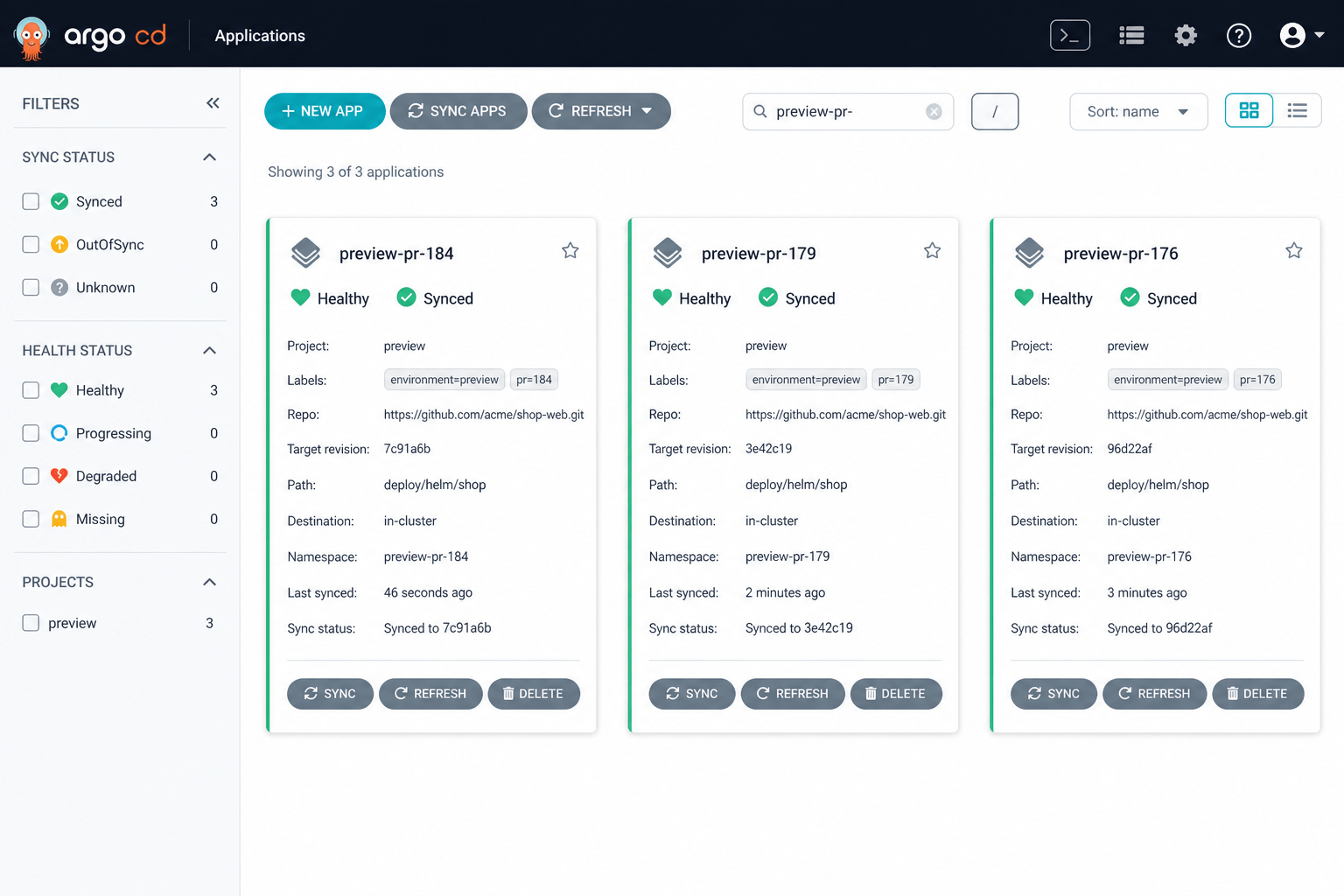
Argo CD shows each pull request as an independently synced and healthy Application.
6. Wait for readiness and comment on the pull request
Add a second job to the GitHub Actions workflow. It waits for the public endpoint, performs a smoke test, and updates a single bot comment instead of adding a new comment on every commit:
  verify-preview:
    needs: build-image
    runs-on: ubuntu-latest
    env:
      PR_NUMBER: ${{ github.event.pull_request.number }}
      PREVIEW_URL: https://pr-${{ github.event.pull_request.number }}.preview.acme.dev

    steps:
      - name: Wait for preview
        run: |
          for attempt in $(seq 1 40); do
            if curl --fail --silent --show-error \
              --max-time 10 "$PREVIEW_URL/readyz"; then
              exit 0
            fi
            echo "Preview is not ready yet: attempt $attempt/40"
            sleep 15
          done
          exit 1

      - name: Smoke test
        run: curl --fail --silent --show-error "$PREVIEW_URL/api/health"

      - name: Add or update preview comment
        uses: actions/github-script@v9
        with:
          script: |
            const marker = '<!-- preview-environment -->';
            const body = `${marker}
            ## ✅ Preview environment is ready

            | Item | Value |
            |---|---|
            | URL | ${process.env.PREVIEW_URL} |
            | Commit | \`${context.payload.pull_request.head.sha.slice(0, 7)}\` |
            | Namespace | \`preview-pr-${process.env.PR_NUMBER}\` |

            [View deployment](${process.env.PREVIEW_URL})`;

            const comments = await github.paginate(
              github.rest.issues.listComments,
              { ...context.repo, issue_number: context.issue.number }
            );
            const existing = comments.find(comment =>
              comment.user.type === 'Bot' && comment.body.includes(marker)
            );

            if (existing) {
              await github.rest.issues.updateComment({
                ...context.repo,
                comment_id: existing.id,
                body
              });
            } else {
              await github.rest.issues.createComment({
                ...context.repo,
                issue_number: context.issue.number,
                body
              });
            }
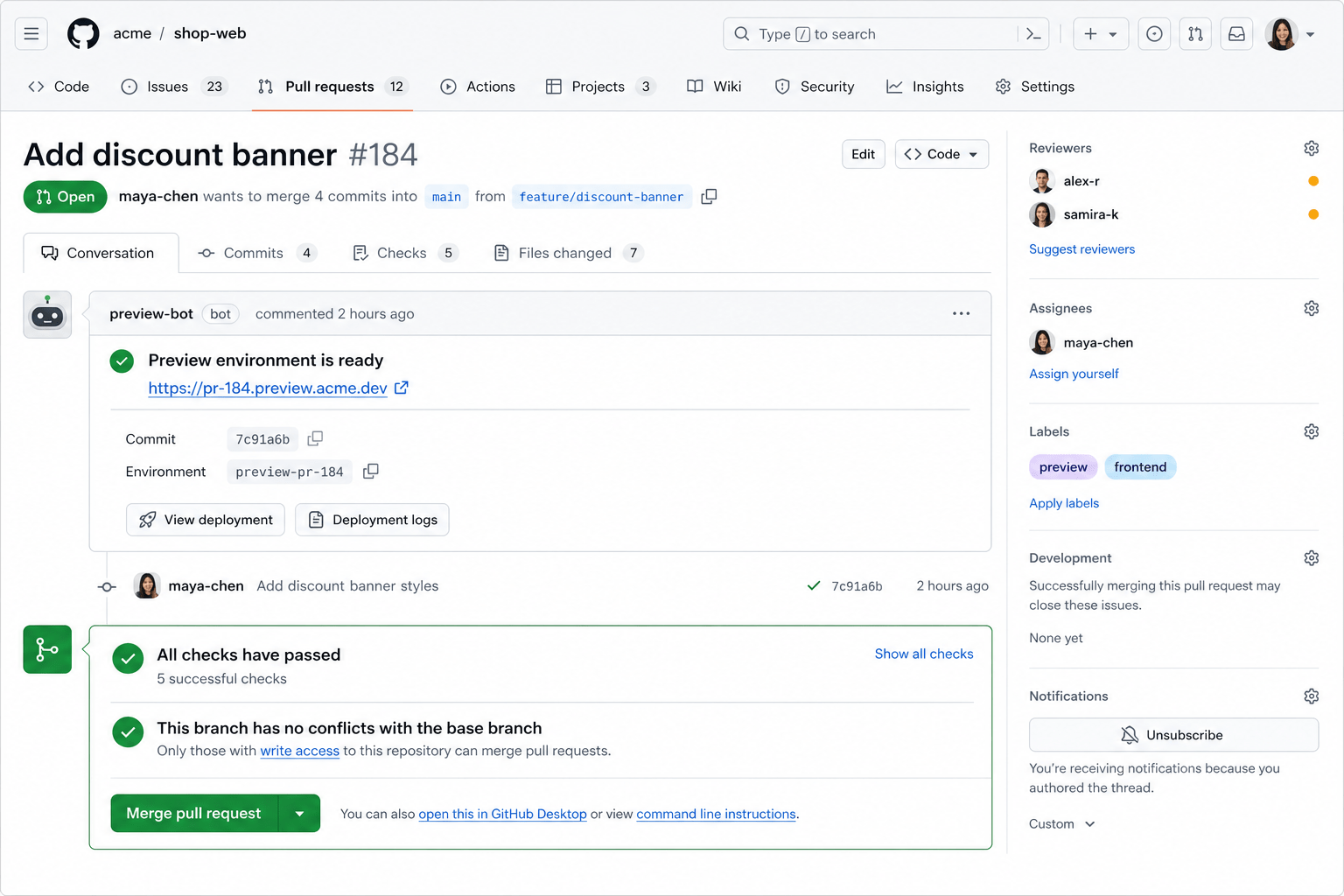
The pull request becomes the control panel: reviewers get the URL, commit, environment name, logs, and deployment status in context.
7. Prove that cleanup works
Inspect the generated resources while the pull request is open:
kubectl get namespace preview-pr-184
kubectl get all,ingress,resourcequota,limitrange -n preview-pr-184
argocd app get preview-pr-184
Remove the preview label or close the pull request. After the next webhook event or poll, the PR no longer matches the generator. ApplicationSet removes preview-pr-184; the Argo CD finalizer removes its managed resources.
kubectl get application preview-pr-184 -n argocd
kubectl get namespace preview-pr-184
Both commands should eventually return NotFound. Test this lifecycle before inviting the whole engineering organization to use previews. Creation is only half of the feature; deletion is the cost-control mechanism.
Data, migrations, and external services
The stateless web tier is easy. Data needs an explicit policy:
- Shared sandbox database: cheapest, but use a schema or tenant keyed by the PR number.
- Database per preview: strongest isolation, but slower and more expensive.
- Snapshot on demand: useful for realistic QA; scrub production data before copying it.
- Mock external integrations: default for email, payments, webhooks, and destructive APIs.
Run backward-compatible migrations in previews. A pull request environment should not share a mutable schema with staging if its migration can break other teams.
Production guardrails that matter
Require an explicit label
Do not deploy every typo fix automatically. A preview label gives maintainers a cost and trust gate while keeping the workflow self-service.
Put hard limits on every namespace
ResourceQuota limits aggregate consumption; LimitRange supplies sane defaults. Also cap the number of simultaneous preview Applications and monitor cluster headroom.
Restrict network access
Apply default-deny NetworkPolicies, then allow only DNS, the Ingress controller, and approved dependencies. Preview workloads should not inherit unrestricted access to production networks.
Keep secrets outside pull-request code
Mount low-privilege sandbox credentials from a trusted secret store. Never expose production credentials, cloud-admin roles, or the Argo CD GitHub App key to a preview Pod.
Set a maximum lifetime
PR closure should be the primary deletion signal. Add a secondary TTL sweeper for abandoned pull requests, webhook failures, and controller outages. Label namespaces with the PR number and creation time so the sweeper can audit them safely.
Observe the entire lifecycle
Track time to image, time to Healthy, smoke-test duration, active preview count, failed cleanups, namespace cost, pending Pods, and GitHub API rate-limit remaining. A useful platform SLO is: “95% of approved preview environments become reachable within five minutes.”
Common failure modes
Application exists but the Pod reports ImagePullBackOff: verify that the SHA tag exists, GHCR pull credentials are available, and the image package grants the cluster read access.
kubectl describe pod -n preview-pr-184
Argo CD does not discover the PR: verify the preview label, GitHub App permissions, API rate limit, and ApplicationSet controller logs.
kubectl logs -n argocd \
  deployment/argocd-applicationset-controller \
  --since=10m
The hostname returns a certificate or DNS error: confirm wildcard DNS, the Ingress load balancer address, the wildcard certificate, and the rendered host.
kubectl get ingress -n preview-pr-184
dig +short pr-184.preview.acme.dev
The PR closed but resources remain: check whether the generated Application still exists, whether preserveResourcesOnDeletion was enabled, and whether the Argo CD resource finalizer is completing.
Too many previews make Pods Pending: enforce quotas, add node autoscaling, restrict previews to labelled PRs, and expire inactive environments.
Final thoughts
A preview platform is successful when it feels boring: add a label, wait for a green check, open the URL, and close the pull request when the review is finished. The complexity belongs in the platform, not in each application repository.
The strongest design choices are separation of responsibilities and trust. GitHub Actions builds an immutable artifact. A protected GitOps repository defines what previews may create. Argo CD continuously reconciles the environment. Kubernetes enforces the resource and network boundaries. The pull request itself controls the lifecycle.
Start with one service, one cluster, and one explicit preview label. Measure creation and deletion reliability before adding database snapshots, multiple services, or production-like integrations.


Leave a Comment
Your email address will not be published. Required fields are marked with *