


Running OpenShift across several datacentres creates two related availability problems. First, every cluster needs a reliable local entry point for the Kubernetes API, machine configuration service, and application ingress. Second, users need a global entry point that stops returning a datacentre when its service is unhealthy.
This guide builds both layers with a three-node HAProxy Fusion Control Plane, an active-active HAProxy Enterprise pair in every participating datacentre, four authoritative GSLB nodes split across two sites, delegated DNS, and OpenShift service discovery. In the steady state, both Enterprise nodes carry production traffic. If either node fails, its virtual IP moves to the surviving peer, which temporarily serves both addresses. The example uses four datacentres and five OpenShift clusters, but the pattern scales down or out.
The addresses and names below are examples. Replace them with approved values from your IPAM, DNS, security, and platform teams.
Target architecture
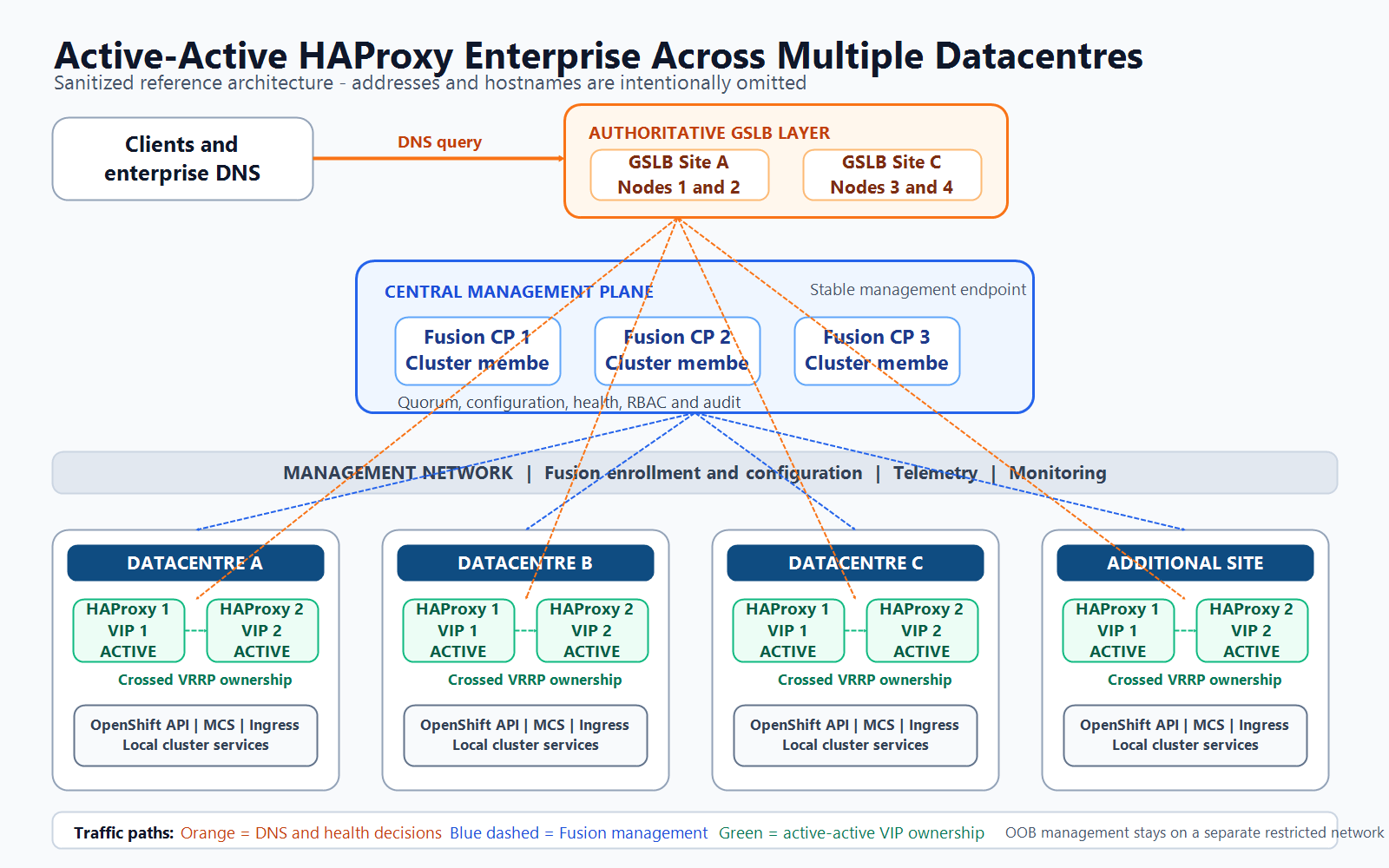
The design is easier to operate when it is separated into three layers: a central management plane, a local data plane in each application site, and a global DNS layer. The sanitized asset inventory supports the following production pattern:
- Fusion Control Plane: three members form one highly available management cluster. They manage configuration, enrollment, health, version state, RBAC, and audit visibility. Fusion is not placed in the application traffic path.
- Local HAProxy Enterprise data plane: every participating datacentre has a two-node pair. Both nodes serve traffic during normal operation.
- Crossed VRRP ownership: node 1 owns service VIP 1 and backs up VIP 2. Node 2 owns service VIP 2 and backs up VIP 1. If either node fails, the surviving peer temporarily owns both VIPs.
- Distributed GSLB: four authoritative DNS nodes are split across two sites as two nodes per site. GSLB health-checks the application endpoints and stops returning an unhealthy site or service address.
- OpenShift service layer: each local pair fronts the Kubernetes API, Machine Config Server, and application ingress for one or more local clusters.
- Separated networks: frontend, backend, management, telemetry, peer-synchronization, DNS, and out-of-band management traffic follow distinct security policies.
How requests and configuration move through the platform
- A client asks enterprise DNS for an API or application name in the delegated zone.
- One of the four GSLB nodes answers with the healthy service VIPs for the selected datacentre.
- The client connects to a local VIP. Under normal conditions, each VIP lands on a different HAProxy Enterprise node, so both nodes carry traffic.
- HAProxy forwards the connection across the backend network to healthy OpenShift control-plane, Machine Config Server, or ingress targets.
- Fusion pushes approved configuration to the local pair through the management network and receives health, statistics, and telemetry without becoming part of the client data path.
| Network plane | Primary purpose | Security boundary |
|---|---|---|
| Frontend | Client connections to active service VIPs | Permit only published application and platform ports |
| Backend | HAProxy connections to OpenShift services | Allow only approved cluster subnets and health checks |
| Management | Fusion enrollment, configuration, administration, and status | Restricted to administrators, automation, Fusion, and managed nodes |
| Telemetry | Logs, metrics, statistics, and profiling | Send only to approved observability systems |
| Peer synchronization | Stick-table, counter, and HA state exchange between local peers | Local pair only |
| DNS and GSLB | Authoritative DNS replies and application health checks | Expose TCP/UDP 53 only to approved resolvers or clients |
| Out-of-band | Server hardware administration | Separate restricted network; never carry application traffic |
HAProxy documents the local active-active pattern as two active-standby VRRP groups operating in opposite directions. DNS or GSLB distributes clients across both VIPs, while either node can inherit the peer’s VIP during failure. See the official HAProxy Enterprise active-active guide, Fusion overview, GSLB guide, and OpenShift external load-balancer requirements.
1. Freeze the deployment inputs
Do not begin installation with unresolved DNS, routing, VLAN, firewall, or ownership decisions. Keep the production values in a controlled inventory. The public example below uses reserved documentation addresses and generic names.
architecture:
  fusion_control_plane:
    members: 3
    placement: management-site

  gslb:
    site_a_nodes: [gslb-a-01, gslb-a-02]
    site_c_nodes: [gslb-c-01, gslb-c-02]
    delegated_zone: apps.example.net

  datacentres:
    - name: dc-a
      hapee_nodes: [lb-a-01, lb-a-02]
      service_vips: [192.0.2.50, 192.0.2.51]
      vrrp_ids: [51, 52]
    - name: dc-b
      hapee_nodes: [lb-b-01, lb-b-02]
      service_vips: [198.51.100.50, 198.51.100.51]
      vrrp_ids: [61, 62]

  networks:
    frontend: client-facing
    backend: openshift-services
    management: fusion-and-telemetry
    out_of_band: hardware-administration-only
For each datacentre, record the two node-management addresses, two routable service VIPs, unique VRIDs, frontend and backend VLANs, OpenShift control-plane and ingress targets, routing gateway, DNS, NTP, log destination, and ownership contacts. Do not reuse a VRID on the same Layer 2 domain. Store hardware-management addresses separately from the operating-system and application inventory.
2. Validate capacity and connectivity
A conservative production starting point for the project is 16 CPU cores, 32 GB RAM, and 256 GB storage per designated server, subject to measured connection rate, TLS workload, log retention, and vendor sizing. HAProxy’s own Linux installation guide stresses that actual sizing depends on traffic and cryptographic workload.
Check time synchronization and forward/reverse DNS first:
timedatectl status
chronyc sources -v
getent hosts fusion.example.net
getent hosts lb-a-01.example.net
dig -x 192.0.2.21 +short
Confirm management reachability from Fusion to each load balancer. Fusion-managed Enterprise nodes use HTTPS for the Data Plane API; the enrollment workflow shown later supplies the precise port and certificates for your release.
nc -vz lb-a-01.example.net 5555
nc -vz lb-a-02.example.net 5555
curl -kIs https://lb-a-01.example.net:5555/
Open only the flows approved by the design. The groups below reflect the architecture, but product ports can change between releases. Validate them against the documentation and installation bundle for the version you deploy.
| Flow | Protocol and representative ports | Purpose |
|---|---|---|
| Fusion member to Fusion member | TCP 2181, 2379-2380, 5432, 7000, 8008, 8123, 9000, 9009, 9234, 9440 | Control-plane quorum, databases, and internal synchronization |
| Fusion to HAProxy Enterprise | TCP 4443, 4445, 5555, 5108-5208, 9000, 9440 | Enrollment, configuration push, Data Plane API, statistics, and metrics |
| HAProxy Enterprise to central services | TCP/UDP 514; TCP 9888 | Remote logging, telemetry, and profiling |
| Local HAProxy peer to peer | TCP 10024 and release-specific synchronization ports; VRRP protocol | Stick tables, counters, health state, and VIP ownership |
| Administrators and automation to Fusion | TCP 22, 4443, 4445 or release-approved equivalents | SSH, UI, API, and controlled administration |
| Clients to HAProxy Enterprise | TCP 80, 443, and 6443 as published | Application ingress and Kubernetes API |
| HAProxy Enterprise to OpenShift | TCP 80, 443, 6443, and 22623 where required | Ingress, API, and Machine Config Server forwarding |
| Resolvers and clients to GSLB | UDP/TCP 53 | Authoritative DNS for the delegated zone |
| GSLB to service endpoints | TCP 80, 443, or an approved custom probe port | Site and application health checks |
| Monitoring and logging | TCP 8404; TCP/UDP 514 | Metrics collection and centralized logging |
| Controlled outbound access | TCP 443 and repository-specific ports | Updates, licensing, keys, and threat intelligence |
Red Hat requires TCP 6443 to be balanced across control-plane nodes and TCP 80/443 across the nodes that run ingress. TCP 22623 serves machine configuration and must remain restricted to the provisioning and cluster networks.
3. Prepare every RHEL host
Use a supported RHEL release, patch it, set the hostname, and verify that security controls are active.
sudo hostnamectl set-hostname lb-a-01.example.net
sudo dnf update -y
sudo systemctl enable --now chronyd
sudo getenforce
sudo firewall-cmd --state
Create separate mount points or retention controls for product data and logs. Avoid disabling SELinux or the firewall as a shortcut; add documented policy and firewall rules instead.
Capture the baseline:
uname -r
lscpu
free -h
lsblk
ip -br address
ip route
4. Build the three-node Fusion Control Plane
Obtain the Fusion installation bundle and entitlement from the HAProxy customer portal. Installation commands and supported operating systems vary by Fusion release, so use the exact command supplied with your package rather than copying a bootstrap URL from another environment.
Run the installer on the first node with its permanent hostname and advertised management address, then join nodes two and three using the generated cluster join material. The following commands show the complete shape of a typical bundle-driven installation.
export FUSION_VERSION="1.x.y"
tar -xzf "haproxy-fusion-${FUSION_VERSION}-installer.tar.gz"
cd "haproxy-fusion-${FUSION_VERSION}-installer"

sudo ./install.sh \
  --config ./config/fusion-cp-01.yaml \
  --node-name fusion-cp-01 \
  --advertise-address 192.0.2.11 \
  --cluster-name fusion-production
Command note: This is a representative Fusion installer invocation. Confirm the archive name, install.sh entry point, configuration schema and supported flags in the licensed installation bundle for your exact Fusion release before execution.
sudo install -m 0600 /secure-transfer/fusion-join.token \
  /root/fusion-join.token

sudo ./join.sh \
  --controller https://fusion-cp-01.example.net:9443 \
  --node-name fusion-cp-02 \
  --advertise-address 192.0.2.12 \
  --token-file /root/fusion-join.token

sudo rm -f /root/fusion-join.token
Command note: This join sequence is an operational example. The actual join utility, controller port, certificate bootstrap and token handling are release-specific; use the one-time join material produced by the installed primary node and the instructions shipped with the licensed bundle.
Repeat for the third node, then verify the cluster from the Fusion administration page and the vendor-supplied health command.
sudo systemctl --no-pager --full status haproxy-fusion
sudo journalctl -u haproxy-fusion --since "15 minutes ago" \
  --no-pager

curl --fail --silent --show-error \
  --cacert /etc/haproxy-fusion/pki/ca.crt \
  https://127.0.0.1:9443/healthz
Command note: These checks demonstrate the expected systemd, log and HTTPS-health workflow. Verify the installed service-unit name, health endpoint, port and CA path for your Fusion version; a successful HTTP check alone does not prove that all three control-plane members have quorum.
Put a stable management VIP or approved load-balancer address in front of the Fusion UI. Install a certificate whose SAN list contains the user-facing FQDN, enforce RBAC, connect enterprise identity, and send audit logs to the central platform before onboarding production nodes.
5. Create one Fusion cluster object per HAProxy pair
In Fusion, open Infrastructure → Clusters, create dc-a-hapee, and repeat for the other datacentres. A cluster object should contain nodes that are expected to share one synchronized HAProxy configuration.
Use names that communicate location and role:
dc-a-hapee
dc-b-hapee
dc-c-hapee
dc-d-hapee
Do not place unrelated load balancers in the same cluster merely because they run the same software version. Configuration synchronization and operational actions follow the cluster boundary.
6. Enroll the first HAProxy Enterprise pair
Open Infrastructure → Nodes → Add Node → Automatic node addition. Select bare metal, enter the node’s advertised management address, choose the Data Plane API version supported by your Fusion release, and copy the generated one-time command.
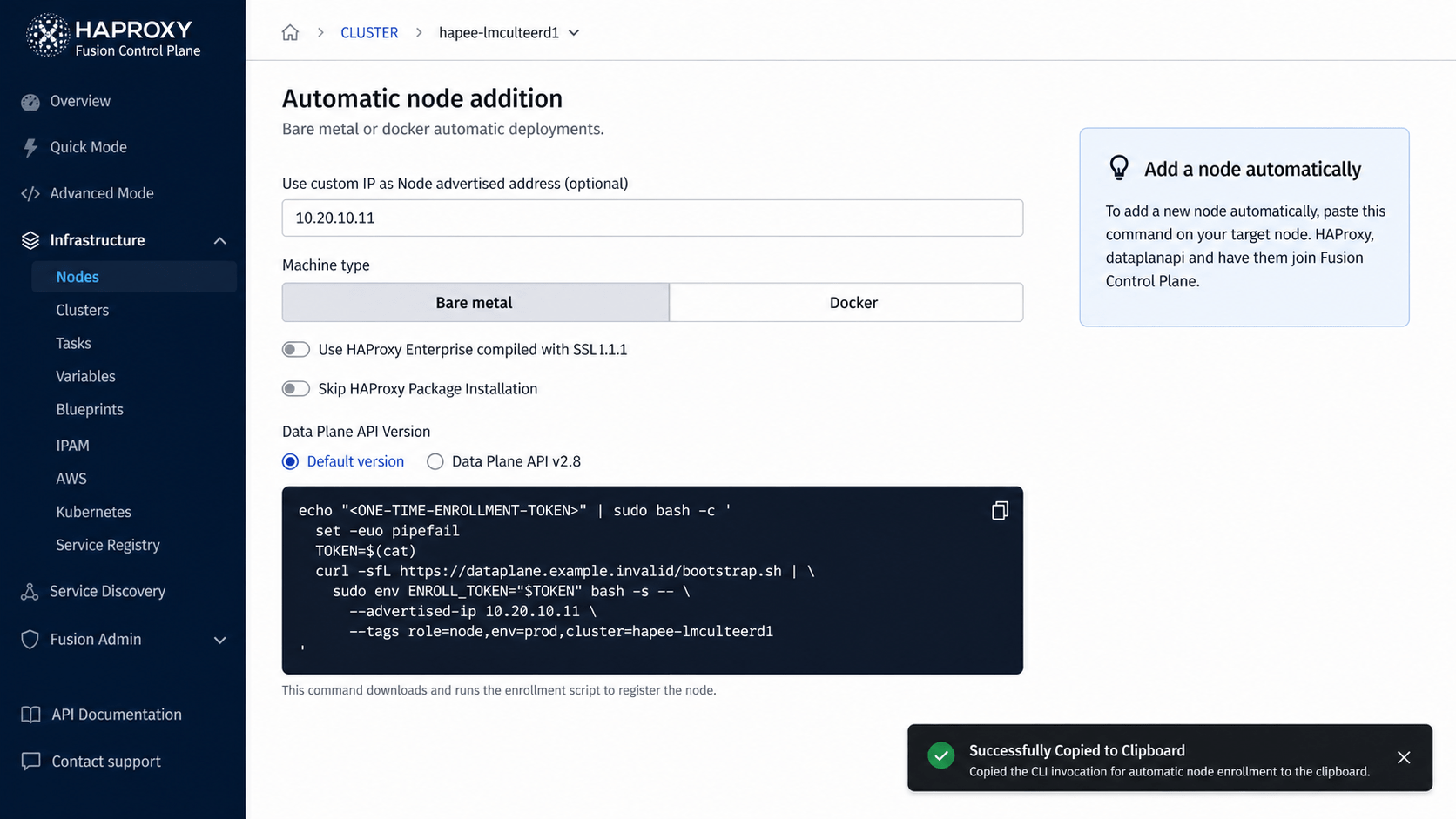
Run the generated command locally on the intended host through the approved privileged-access path.
# Run only the command generated for this exact node and cluster.
sudo <FUSION_GENERATED_ENROLLMENT_COMMAND>
Treat the enrollment command as a secret: it can contain a short-lived token and licensing material. Never paste it into tickets, chat, screenshots, shell history exports, or a public repository.
After the node appears in Awaiting Approval, verify its hostname, address, target cluster, and certificate identity. Approve it, wait for both health checks, and repeat for the peer.

The ready state is unambiguous: both nodes are active, health is 2/2, configuration is OK, no node is out of sync, and the last push completed successfully.
7. Configure true local active-active high availability
The local pair must not be configured as one primary node and one idle standby. HAProxy Enterprise’s documented VRRP design creates two independent groups in opposite directions:
lb-a-01is MASTER for VIP192.0.2.50and BACKUP for VIP192.0.2.51.lb-a-02is BACKUP for VIP192.0.2.50and MASTER for VIP192.0.2.51.- DNS or GSLB presents both VIPs, so both nodes receive traffic during normal operation.
- If one node fails, the peer assumes both VIPs and carries the complete datacentre load until recovery.
Install the supported VRRP module on both RHEL nodes. Confirm the package name against the repository for your installed Enterprise release.
sudo dnf remove -y hapee-extras-vrrp
sudo dnf install -y hapee-extras-vrrp22
sudo systemctl unmask hapee-extras-vrrp
On lb-a-01, configure /etc/hapee-extras/hapee-vrrp.cfg with crossed ownership. The two authentication strings below are examples and must be replaced with environment-specific values.
vrrp_instance OCP_A_VIP_1 {
  interface ens192
  state MASTER
  virtual_router_id 51
  authentication {
    auth_type PASS
    auth_pass dcA-v51
  }
  priority 101
  virtual_ipaddress_excluded {
    192.0.2.50/24
  }
  track_interface {
    ens192 weight -2
  }
  track_script {
    chk_lb
  }
}

vrrp_instance OCP_A_VIP_2 {
  interface ens192
  state BACKUP
  virtual_router_id 52
  authentication {
    auth_type PASS
    auth_pass dcA-v52
  }
  priority 100
  virtual_ipaddress_excluded {
    192.0.2.51/24
  }
  track_interface {
    ens192 weight -2
  }
  track_script {
    chk_lb
  }
}
On lb-a-02, keep the same VIPs, VRIDs, authentication values, interface tracking, and health checks, but reverse the state and priority of both instances.
vrrp_instance OCP_A_VIP_1 {
  interface ens192
  state BACKUP
  virtual_router_id 51
  authentication {
    auth_type PASS
    auth_pass dcA-v51
  }
  priority 100
  virtual_ipaddress_excluded {
    192.0.2.50/24
  }
  track_interface {
    ens192 weight -2
  }
  track_script {
    chk_lb
  }
}

vrrp_instance OCP_A_VIP_2 {
  interface ens192
  state MASTER
  virtual_router_id 52
  authentication {
    auth_type PASS
    auth_pass dcA-v52
  }
  priority 101
  virtual_ipaddress_excluded {
    192.0.2.51/24
  }
  track_interface {
    ens192 weight -2
  }
  track_script {
    chk_lb
  }
}
The packaged chk_lb health script should demote a node that loses the hapee-lb process. Extend health tracking only with deterministic checks that complete quickly; an unstable script can cause unnecessary VIP movement.
Allow VRRP between the peers, verify the switching fabric accepts gratuitous ARP updates, and start the service on both nodes:
sudo firewall-cmd --permanent --add-rich-rule='rule protocol value="vrrp" accept'
sudo firewall-cmd --reload
sudo systemctl enable --now hapee-extras-vrrp

ip -br address show ens192
sudo systemctl --no-pager status hapee-extras-vrrp
sudo tcpdump -n -i ens192 vrrp
The expected steady state is one VIP on each node. If the network blocks multicast or floating-IP movement, do not force VRRP through it. Use a supported active-active alternative such as an upstream Layer 4 tier, ECMP with HAProxy Enterprise Route Health Injection, or the platform’s native load-balancer service.
8. Build the OpenShift frontends and backends
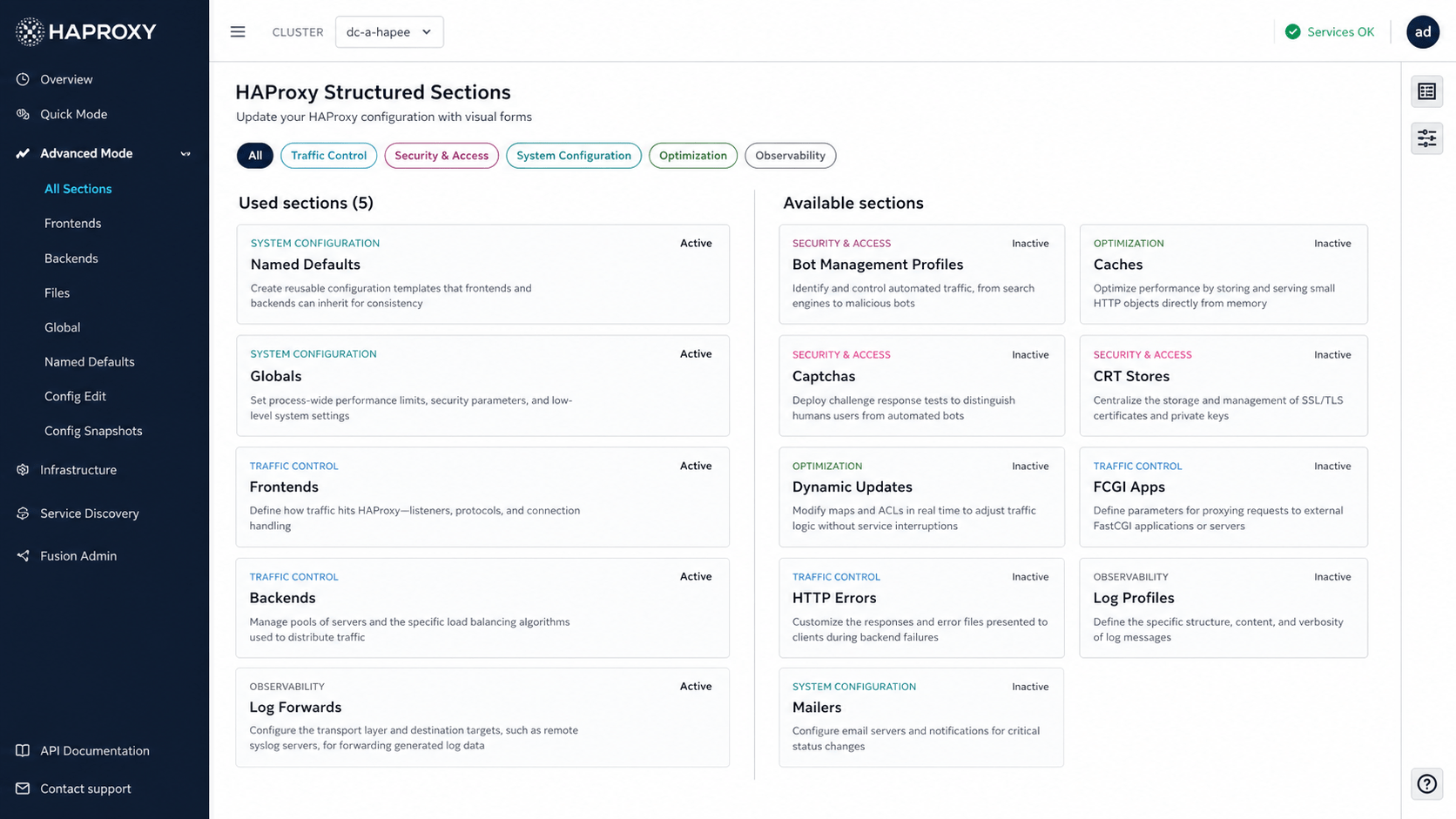
Create reusable Named Defaults and Globals, then define explicit frontends and backends. Fusion’s structured sections make these objects visible without losing the underlying HAProxy model.
Kubernetes API
frontend ocp_prod_a_api
  bind 192.0.2.50:6443 transparent
  bind 192.0.2.51:6443 transparent
  mode tcp
  option tcplog
  default_backend ocp_prod_a_control_plane

backend ocp_prod_a_control_plane
  mode tcp
  balance roundrobin
  option tcp-check
  server master-0 192.0.2.101:6443 check
  server master-1 192.0.2.102:6443 check
  server master-2 192.0.2.103:6443 check
Machine Config Server
frontend ocp_prod_a_mcs
  bind 192.0.2.50:22623 transparent
  bind 192.0.2.51:22623 transparent
  mode tcp
  option tcplog
  default_backend ocp_prod_a_mcs_nodes

backend ocp_prod_a_mcs_nodes
  mode tcp
  balance roundrobin
  option tcp-check
  server master-0 192.0.2.101:22623 check
  server master-1 192.0.2.102:22623 check
  server master-2 192.0.2.103:22623 check
Restrict this frontend at the firewall and routing layers. It is for node bootstrap and configuration retrieval, not public clients.
Application ingress
frontend ocp_prod_a_http
  bind 192.0.2.50:80 transparent
  bind 192.0.2.51:80 transparent
  mode tcp
  default_backend ocp_prod_a_router_http

frontend ocp_prod_a_https
  bind 192.0.2.50:443 transparent
  bind 192.0.2.51:443 transparent
  mode tcp
  default_backend ocp_prod_a_router_https

backend ocp_prod_a_router_http
  mode tcp
  balance source
  option tcp-check
  server infra-0 192.0.2.121:80 check
  server infra-1 192.0.2.122:80 check
  server infra-2 192.0.2.123:80 check

backend ocp_prod_a_router_https
  mode tcp
  balance source
  option tcp-check
  server infra-0 192.0.2.121:443 check
  server infra-1 192.0.2.122:443 check
  server infra-2 192.0.2.123:443 check
The transparent parameter lets the synchronized configuration load on either peer even when that peer does not currently own one of the VIPs. HAProxy also documents net.ipv4.ip_nonlocal_bind=1 or wildcard binds as alternatives; use one method consistently and validate it against your security model.
Use the actual nodes hosting router pods. If routers move dynamically, configure Fusion Kubernetes service discovery after the static path is proven. Publish local DNS records for the API and application endpoints with both datacentre VIPs, or have GSLB return both healthy VIPs. A single DNS address would leave one Enterprise node idle and would not be active-active.
Validate and publish through Fusion. Take a configuration snapshot before every material change and confirm both peers reach the same configuration version.
9. Install the GSLB module on all authoritative DNS nodes
On each of the four authoritative DNS nodes, install the GSLB module from the entitled HAProxy Enterprise repository:
sudo dnf install -y hapee-extras-gslb
sudo cp /etc/hapee-extras/hapee-gslb-example.conf \
  /etc/hapee-extras/hapee-gslb.conf
The service listens on DNS port 53 by default and can also expose a loopback listener. Confirm the packaged environment file before changing it:
sudo grep -E '^(GSLB_LISTEN|GSLB_CONFIGFILE|GSLB_RUNPATH)' \
  /etc/sysconfig/hapee-extras-gslb
Build the zone with a low TTL during commissioning. Each datacentre answer list contains two independently checked service addresses—one for each active-active VIP. This example prefers DC-A as a site while rotating across both healthy DC-A VIPs; it advances to the next datacentre only when DC-A no longer meets its health threshold.
zone apps.example.net
  ttl 30
  record @ SOA ns1.gslb.example.net hostmaster.example.net 2026082001 3600 900 604800 30
  record @ NS ns1.gslb.example.net.
  record @ NS ns2.gslb.example.net.
  record api ttl 30 list DC_A DC_B DC_C DC_D
  record api-int ttl 30 list DC_A DC_B DC_C DC_D
  record * ttl 30 list DC_A DC_B DC_C DC_D

answer-list DC_A
  up_threshold 1
  method multi-up
  option httpchk fall 3 rise 2
  http-check connect port 443 ssl
  http-check send uri /healthz/ready hdr host health.apps.example.net
  http-check expect status 200
  answer-record dc-a-vip-1 192.0.2.10 weight 10
  answer-record dc-a-vip-2 192.0.2.11 weight 10

answer-list DC_B
  up_threshold 1
  method multi-up
  option httpchk fall 3 rise 2
  http-check connect port 443 ssl
  http-check send uri /healthz/ready hdr host health.apps.example.net
  http-check expect status 200
  answer-record dc-b-vip-1 198.51.100.10 weight 10
  answer-record dc-b-vip-2 198.51.100.11 weight 10
Add corresponding answer-list sections for DC-C and DC-D. The addresses in DNS must be client-routable service addresses; where the internal VRRP VIPs are translated at a perimeter, document the one-to-one mapping and test both paths separately. method multi-up returns all healthy addresses in the selected list; use single-rr when policy requires one rotated answer instead. HAProxy Enterprise 3.2r1 and newer can proxy HTTPS health checks through a local HAProxy frontend; follow the official GSLB guide when enabling that path.
Validate, restart, and inspect:
sudo /usr/sbin/hapee-extras-gslb -t \
  -f /etc/hapee-extras/hapee-gslb.conf
sudo systemctl restart hapee-extras-gslb
sudo systemctl --no-pager status hapee-extras-gslb
sudo ss -lunpt | grep ':53'
Maintain the same approved zone data on all four GSLB nodes, with two nodes in each of two sites. Use configuration management or a controlled replication process, validate every node before promotion, and avoid manual copy-and-paste as the steady-state operating model.

10. Delegate the DNS zone
Create address records for the two authoritative GSLB nameservers, then delegate the child zone from the parent DNS:
ns1.gslb.example.net.  A   192.0.2.53
ns2.gslb.example.net.  A   198.51.100.53

apps.example.net.      NS  ns1.gslb.example.net.
apps.example.net.      NS  ns2.gslb.example.net.
Where the nameserver itself sits below the delegated zone, add the required glue records in the parent. Keep both UDP and TCP 53 reachable; large DNS responses and fallback behavior can require TCP.
Test each authority directly before relying on recursive DNS:
dig @192.0.2.53 apps.example.net SOA +norecurse
dig @198.51.100.53 api.apps.example.net A +norecurse
dig @192.0.2.53 test.apps.example.net A +norecurse
dig +trace api.apps.example.net
11. Connect OpenShift service discovery
In Service Discovery → Kubernetes, register each OpenShift API endpoint with a dedicated service account. Grant only the read permissions required to discover services, endpoints, and endpoint slices; do not use cluster-admin.
apiVersion: v1
kind: ServiceAccount
metadata:
  name: haproxy-fusion-discovery
  namespace: haproxy-system
---
apiVersion: rbac.authorization.k8s.io/v1
kind: ClusterRole
metadata:
  name: haproxy-fusion-discovery
rules:
  - apiGroups: [""]
    resources: ["services", "endpoints", "namespaces"]
    verbs: ["get", "list", "watch"]
  - apiGroups: ["discovery.k8s.io"]
    resources: ["endpointslices"]
    verbs: ["get", "list", "watch"]
Bind the role to the service account, issue a short-lived token or use the supported identity method, install the OpenShift API CA in Fusion, and scope discovery rules to approved namespaces and labels.
oc auth can-i list services \
  --as=system:serviceaccount:haproxy-system:haproxy-fusion-discovery \
  --all-namespaces

oc auth can-i create secrets \
  --as=system:serviceaccount:haproxy-system:haproxy-fusion-discovery \
  --all-namespaces
The first command should return yes; the second should return no.
12. Execute failure tests
Treat failover as a test plan, not an assumption.
Local node failure
- Confirm VIP 1 is owned by
lb-a-01and VIP 2 bylb-a-02. - Prove both addresses are receiving connections before the test.
- Stop HAProxy Enterprise on one node during the approved window.
- Confirm both VIPs are now present on the surviving peer.
- Verify API, machine-configuration, and application flows through both addresses.
- Restore the node and confirm the configured preemption policy redistributes the VIPs one per node.
ssh lb-a-01 'ip -br address show ens192'
ssh lb-a-02 'ip -br address show ens192'

curl -k --resolve api.ocp-prod-a.example.net:6443:192.0.2.50 \
  https://api.ocp-prod-a.example.net:6443/readyz
curl -k --resolve api.ocp-prod-a.example.net:6443:192.0.2.51 \
  https://api.ocp-prod-a.example.net:6443/readyz

curl -kI --resolve console-openshift-console.apps.example.net:443:192.0.2.50 \
  https://console-openshift-console.apps.example.net/
curl -kI --resolve console-openshift-console.apps.example.net:443:192.0.2.51 \
  https://console-openshift-console.apps.example.net/
Measure the failover interval, failed connection count, and session behavior. Active-active removes the idle node, but it does not create capacity from nothing: each node must be sized to absorb the full datacentre peak during a peer outage.
Datacentre failure
- Make the GSLB health endpoint fail for DC-A.
- Query both authoritative nodes repeatedly.
- Confirm DC-A’s addresses disappear after the configured fall count.
- Wait through the DNS TTL and test client traffic.
- Restore the endpoint and confirm the addresses return only after the rise count.
for i in {1..10}; do
  date
  dig @192.0.2.53 test.apps.example.net A +short
  sleep 5
done
Also test one GSLB node down, one Fusion node down, a broken configuration push, expired certificates, loss of OpenShift API reachability, and rollback to the previous Fusion configuration snapshot.
13. Roll out to the remaining datacentres
Use a repeatable wave:
- Build and harden the two local HAProxy Enterprise nodes.
- Create the Fusion cluster object.
- Enroll, approve, and health-check both nodes.
- Configure crossed VRRP ownership and confirm one VIP is active on each node.
- Add OpenShift API, MCS, and ingress paths.
- Test locally without GSLB traffic.
- Add the datacentre to GSLB with zero or test-only weight.
- Run functional and failover tests.
- Enable production selection.
- Capture as-built documentation and acceptance evidence.
Do not add a new datacentre to public DNS merely because its nodes appear green in Fusion. The acceptance gate is end-to-end: DNS answer, VIP ownership, HAProxy health, OpenShift API readiness, router response, logs, metrics, and failover.
Production acceptance checklist
- Three Fusion nodes are healthy behind the approved management endpoint.
- SSO, RBAC, certificates, backups, audit logging, and monitoring are enabled.
- Every HAProxy Enterprise pair is synchronized and reports 2/2 healthy.
- In steady state, each HAProxy Enterprise node owns one VIP and carries measured production traffic.
- On peer failure, both local VIPs move to the survivor within the agreed recovery objective.
- Each node has enough headroom to carry the full datacentre peak while its peer is unavailable.
- OpenShift 6443, 22623, 80, and 443 paths match the platform design.
- Port 22623 is not exposed to untrusted networks.
- Both GSLB nodes answer authoritatively over UDP and TCP.
- Parent DNS delegates the child zone to both GSLB nameservers.
- GSLB removes failed datacentres and restores them only after the rise threshold.
- GSLB health-checks both active-active VIPs independently and returns only usable addresses.
- OpenShift discovery uses least-privilege, scoped credentials.
- Configuration snapshots and rollback have been tested.
- Operations teams have the runbook, diagrams, credentials handover, monitoring dashboards, and support escalation path.
The most reliable sequence is control plane first, one complete active-active datacentre second, GSLB and delegation third, and the remaining datacentres in controlled waves. The design is complete only when both nodes demonstrably carry traffic in steady state and either node can absorb both VIPs during failure. That approach turns every stage into a repeatable pattern and keeps the blast radius small while the platform team proves health checks, failover, and OpenShift integration.


Leave a Comment
Your email address will not be published. Required fields are marked with *