


Creating an Amazon EKS cluster with Terraform is straightforward. Designing a module that dozens of teams can upgrade safely for years is not. Production module design is less about wrapping every aws_eks_* resource and more about defining stable ownership, explicit contracts, predictable state boundaries, and an upgrade path that does not surprise callers.
This guide builds an opinionated terraform-aws-eks-platform module for a multi-account AWS environment. It provisions the EKS control plane, access entries, essential managed add-ons, encryption, logging, and baseline managed node groups. Separate root stacks own networking and Kubernetes-level platform services. That separation keeps the module useful without turning it into an entire cloud platform hidden behind one call.
Start with ownership, not files
A module boundary is an operational boundary. Resources that share a lifecycle and are normally changed together belong together. Resources with different credentials, failure modes, or upgrade schedules usually do not.
For this platform, use three root states:
- Network: VPC, subnets, routing, NAT gateways, VPC endpoints, and shared DNS.
- EKS: control plane, security groups, access entries, managed node groups, essential EKS add-ons, KMS, and Karpenter’s AWS-side dependencies.
- Platform add-ons: Kubernetes and Helm resources such as AWS Load Balancer Controller, ExternalDNS, metrics-server, observability agents, policy engines, and ingress classes.
The EKS module accepts vpc_id and private_subnet_ids; it does not create a VPC. HashiCorp recommends relatively flat module trees and composition through inputs and outputs. This dependency-inversion style lets callers provide a new VPC, an existing VPC, or a shared network without adding conditional discovery logic to the EKS module.
Repository structure
Follow Terraform’s standard module structure, then add files by responsibility rather than allowing main.tf to become a thousand-line catalog.
terraform-aws-eks-platform/
├── README.md
├── versions.tf
├── variables.tf
├── locals.tf
├── main.tf
├── access.tf
├── addons.tf
├── node-groups.tf
├── pod-identity.tf
├── outputs.tf
├── moved.tf
├── examples/
│   ├── complete/
│   └── private-cluster/
└── tests/
    ├── defaults.tftest.hcl
    └── validation.tftest.hcl
The filenames are for humans; Terraform evaluates all top-level .tf files in a directory as one module. Keep examples outside the module root so their resources are not accidentally included.
Pin the compatibility envelope
Declare the minimum Terraform version and provider versions the module is tested against. A reusable module should declare providers but must not configure them; provider configuration belongs in the calling root module.
terraform {
  required_version = ">= 1.10.0, < 2.0.0"

  required_providers {
    aws = {
      source  = "hashicorp/aws"
      version = ">= 6.0, < 7.0"
    }
    tls = {
      source  = "hashicorp/tls"
      version = ">= 4.0, < 5.0"
    }
  }
}
The production root module can be stricter and commit its dependency lock file:
terraform {
  required_version = "~> 1.13.0"

  required_providers {
    aws = {
      source  = "hashicorp/aws"
      version = "~> 6.10"
    }
  }
}

provider "aws" {
  region = var.aws_region

  default_tags {
    tags = local.required_tags
  }
}
Wide constraints in the reusable module make composition possible. Tight constraints and .terraform.lock.hcl in the root make deployments reproducible.
Design a small, typed public interface
Every input becomes an API you must support. Prefer a few typed objects that describe platform concepts over dozens of loosely related booleans.
variable "cluster" {
  description = "Core EKS cluster configuration."
  type = object({
    name               = string
    kubernetes_version = string
    service_ipv4_cidr  = optional(string, "172.20.0.0/16")
    deletion_protection = optional(bool, true)
    enabled_log_types = optional(set(string), [
      "api", "audit", "authenticator", "controllerManager", "scheduler"
    ])
  })

  validation {
    condition     = can(regex("^[a-z0-9][a-z0-9-]{2,99}$", var.cluster.name))
    error_message = "cluster.name must be a lowercase, DNS-compatible name."
  }
}
Make the network contract explicit:
variable "network" {
  description = "Existing VPC and private subnets used by EKS."
  type = object({
    vpc_id             = string
    private_subnet_ids = list(string)
    control_plane_subnet_ids = optional(list(string), [])
  })

  validation {
    condition     = length(var.network.private_subnet_ids) >= 2
    error_message = "At least two private subnets are required for availability."
  }
}
Avoid inputs such as create_vpc, lookup_subnets, or discover_kms_key. They combine ownership and discovery inside the module, making plans dependent on ambient account state.
Build on a focused upstream module
It is reasonable for an internal platform module to compose the widely used terraform-aws-modules/eks/aws module instead of recreating every EKS resource. Your module adds organizational policy, stable defaults, and a smaller interface. Pin the upstream version and upgrade it deliberately.
module "eks" {
  source  = "terraform-aws-modules/eks/aws"
  version = "~> 21.20"

  name               = var.cluster.name
  kubernetes_version = var.cluster.kubernetes_version

  vpc_id                   = var.network.vpc_id
  subnet_ids               = var.network.private_subnet_ids
  control_plane_subnet_ids = length(var.network.control_plane_subnet_ids) > 0 ? var.network.control_plane_subnet_ids : var.network.private_subnet_ids

  endpoint_public_access  = false
  endpoint_private_access = true
  enabled_log_types       = var.cluster.enabled_log_types
  deletion_protection     = var.cluster.deletion_protection

  authentication_mode = "API_AND_CONFIG_MAP"

  tags = local.tags
}
Use API_AND_CONFIG_MAP only during migration from aws-auth. New platforms can use API mode and manage access through EKS access entries. Test authentication-mode changes carefully because they affect how administrators recover access.

The private registry exposes a stable module contract, version history, inputs, outputs, dependencies, and example usage.
Make secure defaults difficult to disable
Production defaults should include a private API endpoint, control-plane logs, envelope encryption, deletion protection, and restricted security-group rules. Exceptions should be visible in code review.
resource "aws_kms_key" "eks_secrets" {
  description             = "EKS secrets encryption for ${var.cluster.name}"
  deletion_window_in_days = 30
  enable_key_rotation     = true

  tags = local.tags
}

resource "aws_kms_alias" "eks_secrets" {
  name          = "alias/eks/${var.cluster.name}/secrets"
  target_key_id = aws_kms_key.eks_secrets.key_id
}
Pass the key to the cluster configuration:
encryption_config = {
  provider_key_arn = aws_kms_key.eks_secrets.arn
  resources        = ["secrets"]
}
Do not expose an input that disables encryption merely for convenience. If a non-production environment genuinely needs different behavior, publish a documented exception or a separate lightweight module.
Model access as data
EKS access entries are easier to audit than imperative edits to the aws-auth ConfigMap. Accept a map keyed by a durable name, and keep the IAM principal ARN in the value.
variable "access_entries" {
  description = "IAM principals granted access through the EKS access API."
  type = map(object({
    principal_arn = string
    type          = optional(string, "STANDARD")
    policy_arn    = string
    access_scope = object({
      type       = string
      namespaces = optional(list(string), [])
    })
  }))
  default = {}
}
Create entries and policy associations with stable for_each keys:
resource "aws_eks_access_entry" "this" {
  for_each = var.access_entries

  cluster_name  = module.eks.cluster_name
  principal_arn = each.value.principal_arn
  type          = each.value.type
}

resource "aws_eks_access_policy_association" "this" {
  for_each = var.access_entries

  cluster_name  = module.eks.cluster_name
  principal_arn = each.value.principal_arn
  policy_arn    = each.value.policy_arn

  access_scope {
    type       = each.value.access_scope.type
    namespaces = each.value.access_scope.namespaces
  }
}
Using a map avoids address churn when an entry is added. A list with count can cause every later index to move.
Separate system capacity from application capacity
Give critical controllers a small On-Demand managed node group. Use Karpenter or additional managed node groups for application capacity. This ensures DNS, CNI, storage, autoscaling, and admission controllers have somewhere stable to run.
variable "managed_node_groups" {
  type = map(object({
    instance_types = set(string)
    capacity_type  = optional(string, "ON_DEMAND")
    min_size       = number
    max_size       = number
    desired_size   = number
    labels         = optional(map(string), {})
    taints = optional(map(object({
      key    = string
      value  = string
      effect = string
    })), {})
  }))
}
Apply safe defaults before merging caller overrides:
locals {
  node_group_defaults = {
    ami_type       = "AL2023_x86_64_STANDARD"
    disk_size      = 80
    use_name_prefix = true
    update_config = {
      max_unavailable_percentage = 25
    }
  }
}

module "eks" {
  # Other arguments omitted
  eks_managed_node_group_defaults = local.node_group_defaults
  eks_managed_node_groups         = var.managed_node_groups
}
A production caller can define the system group without learning the module’s internal resource addresses:
managed_node_groups = {
  system = {
    instance_types = ["m7i.large", "m7a.large"]
    capacity_type  = "ON_DEMAND"
    min_size       = 3
    desired_size   = 3
    max_size       = 6
    labels = {
      workload = "system"
    }
    taints = {
      critical = {
        key    = "CriticalAddonsOnly"
        value  = "true"
        effect = "NO_SCHEDULE"
      }
    }
  }
}
Treat add-ons as two lifecycle classes
Essential EKS add-ons belong with the cluster because they are version-compatible infrastructure components. Helm-based platform services belong in the separate add-ons state because they require a working Kubernetes API and often release more frequently.
eks_addons = {
  vpc-cni = {
    most_recent    = true
    before_compute = true
  }
  coredns = {
    most_recent = true
  }
  kube-proxy = {
    most_recent = true
  }
  aws-ebs-csi-driver = {
    most_recent = true
  }
  eks-pod-identity-agent = {
    most_recent    = true
    before_compute = true
  }
}
For the highest reproducibility, resolve and pin tested add-on versions per Kubernetes minor release instead of relying permanently on most_recent. Use it for bootstrap, then record the resolved versions in the production configuration.
Prefer Pod Identity for workload roles
EKS Pod Identity maps an IAM role to a service account and namespace without creating a separate IAM OIDC provider for every cluster. The agent is required on Linux EC2 nodes, and applications must use a supported AWS SDK credential chain.
resource "aws_iam_role" "ebs_csi" {
  name = "${var.cluster.name}-ebs-csi"

  assume_role_policy = jsonencode({
    Version = "2012-10-17"
    Statement = [{
      Effect = "Allow"
      Principal = { Service = "pods.eks.amazonaws.com" }
      Action = ["sts:AssumeRole", "sts:TagSession"]
    }]
  })
}
Create the association declaratively:
resource "aws_eks_pod_identity_association" "ebs_csi" {
  cluster_name    = module.eks.cluster_name
  namespace       = "kube-system"
  service_account = "ebs-csi-controller-sa"
  role_arn        = aws_iam_role.ebs_csi.arn
}
Keep IAM policies close to the component that owns them, but do not hide application-specific permissions inside the cluster module. Application teams should manage their own Pod Identity roles through a separate workload-identity module or stack.
Keep outputs intentional
An output is part of the public API. Export values consumers need, not entire resource objects that expose internal implementation details.
output "cluster" {
  description = "Stable connection details for downstream platform stacks."
  value = {
    name                       = module.eks.cluster_name
    arn                        = module.eks.cluster_arn
    endpoint                   = module.eks.cluster_endpoint
    certificate_authority_data = module.eks.cluster_certificate_authority_data
    security_group_id          = module.eks.cluster_security_group_id
  }
}

output "kms_key_arn" {
  value = aws_kms_key.eks_secrets.arn
}
Do not output tokens, generated kubeconfig files, or credentials. Downstream automation can use the cluster name with aws eks get-token.
Compose the production root
The root module contains environment facts, backend configuration, provider aliases, and the approved module version.
module "eks_platform" {
  source  = "app.terraform.io/acme-platform/eks-platform/aws"
  version = "3.4.1"

  cluster = {
    name                = "platform-prod-eu-west-1"
    kubernetes_version  = "1.34"
    deletion_protection = true
  }

  network = {
    vpc_id             = data.terraform_remote_state.network.outputs.vpc_id
    private_subnet_ids = data.terraform_remote_state.network.outputs.private_subnet_ids
  }

  managed_node_groups = local.managed_node_groups
  access_entries      = local.access_entries
  tags                = local.required_tags
}
Remote state is convenient, but it grants the reader access to the full state snapshot. Where that is too broad, publish non-sensitive integration values to AWS Systems Manager Parameter Store and read them with data sources.
Configure remote state per environment
Never put development and production clusters in the same state. With the S3 backend, enable encryption, bucket versioning, restricted access, and native state locking.
terraform {
  backend "s3" {
    bucket       = "acme-prod-terraform-state"
    key          = "eks/eu-west-1/platform-prod/terraform.tfstate"
    region       = "eu-west-1"
    encrypt      = true
    use_lockfile = true
  }
}
Bootstrap the state bucket outside this configuration so destroying the EKS stack cannot destroy its own history.
Add assumptions, guarantees, and checks
Validation messages should explain the platform rule. Preconditions protect assumptions that involve multiple values.
resource "aws_eks_cluster" "example" {
  # Configuration omitted

  lifecycle {
    precondition {
      condition     = !var.endpoint_public_access || length(var.public_access_cidrs) > 0
      error_message = "Public endpoint access requires an explicit CIDR allowlist."
    }
  }
}
Checks can assert post-apply guarantees without unnecessarily blocking recovery:
check "multi_az_subnets" {
  assert {
    condition     = length(toset(data.aws_subnet.private[*].availability_zone)) >= 2
    error_message = "EKS private subnets must span at least two Availability Zones."
  }
}
Test the module as a product
Run cheap static checks on every pull request and real integration tests before releases.
terraform fmt -check -recursive
terraform init -backend=false
terraform validate
tflint --recursive
checkov -d .
terraform test
Terraform test files can use mock providers to validate logic without AWS credentials:
mock_provider "aws" {}

run "private_endpoint_is_the_default" {
  command = plan

  variables {
    cluster = {
      name               = "test-platform"
      kubernetes_version = "1.34"
    }
    network = {
      vpc_id             = "vpc-12345678"
      private_subnet_ids = ["subnet-a", "subnet-b"]
    }
  }

  assert {
    condition     = module.eks.cluster_endpoint_public_access == false
    error_message = "The EKS API endpoint must be private by default."
  }
}
Mocks test contracts and expressions, not AWS behavior. Maintain at least one sandbox integration test that creates a real cluster, verifies nodes and add-ons, exercises authentication, then destroys it.
Gate production plans
Run speculative plans for pull requests. Require reviews for module-version changes, replacement actions, public endpoints, unencrypted resources, and unapproved instance families. Apply only from the protected default branch with short-lived AWS credentials.
terraform plan -out=tfplan
terraform show -json tfplan > tfplan.json
jq '[.resource_changes[] | select(.change.actions | index("delete"))] | length' tfplan.json
The saved plan must be the artifact that is applied; do not run a fresh plan after approval and assume it is identical.

The production workspace shows twelve additions, four in-place changes, no destroys, a cost estimate, and eight passing policy checks before apply.
Design upgrades as normal work
Upgrade one layer at a time: Terraform and providers, the upstream EKS module, EKS control plane, managed add-ons, and then data-plane nodes. Test the same path in a staging cluster first.
Use moved blocks when a refactor changes resource addresses:
moved {
  from = aws_kms_key.cluster
  to   = aws_kms_key.eks_secrets
}
Publish breaking interface changes only in a new major version. Deprecate an input for at least one minor release when practical, document replacement actions, and include example plan output in the release notes.
After an upgrade, verify control plane health, add-ons, access, and nodes:
aws eks describe-cluster \
  --name platform-prod-eu-west-1 \
  --region eu-west-1 \
  --query 'cluster.{status:status,version:version,endpoint:endpoint}'

kubectl get nodes -o wide
kubectl get pods -A
aws eks list-insights --cluster-name platform-prod-eu-west-1
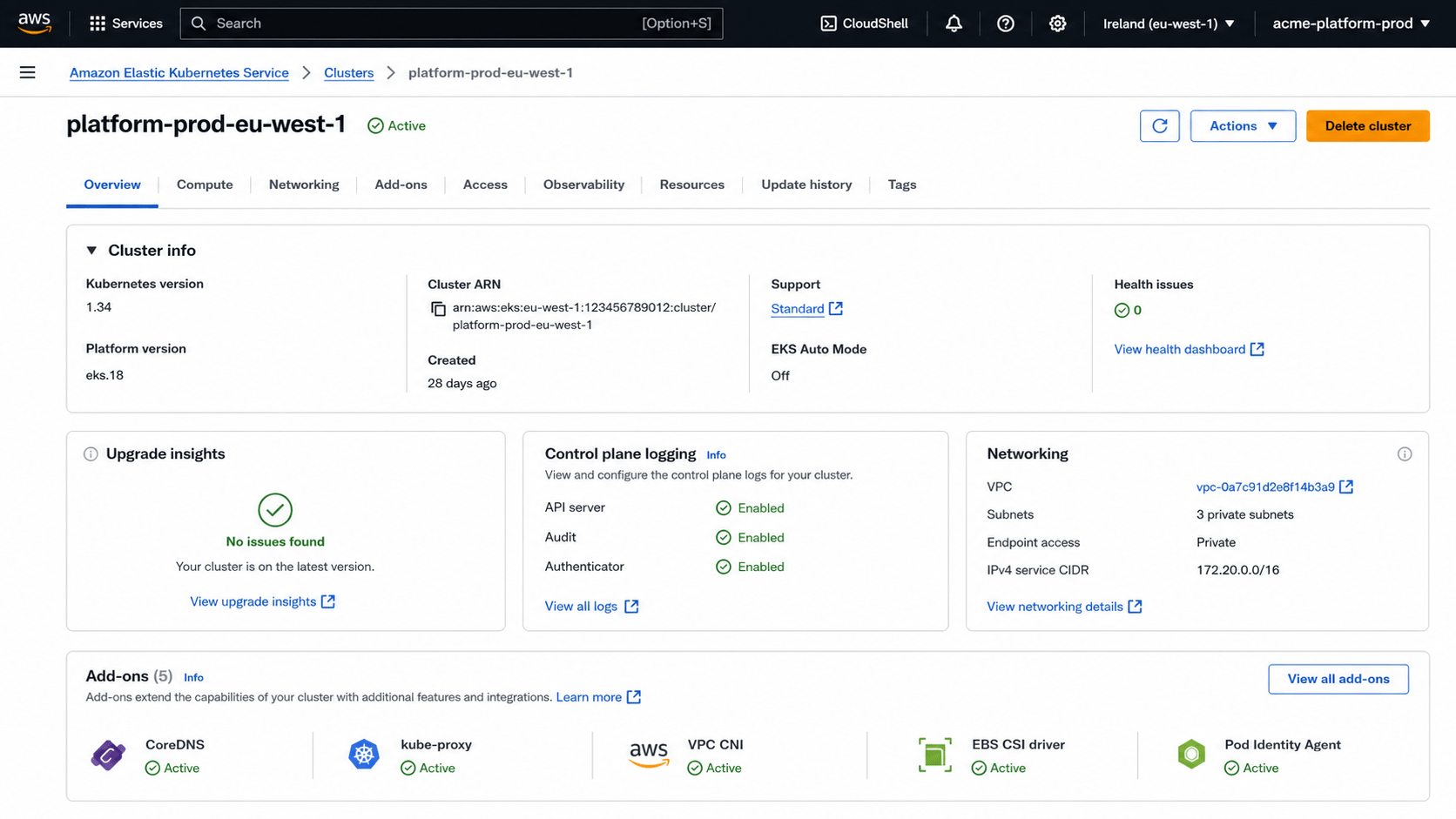
The resulting cluster has a private endpoint, control-plane logging, healthy upgrade insights, and active storage, networking, DNS, proxy, and Pod Identity add-ons.
Production module checklist
- The module represents a meaningful platform capability, not a thin resource wrapper.
- Networking, EKS, and Kubernetes add-ons have separate state and credentials.
- Providers are configured only by root modules.
- Inputs use strict object types, descriptions, defaults, and validation.
- Security controls are defaults, while exceptions are explicit and reviewable.
- Access uses EKS access entries; workload AWS access uses Pod Identity where supported.
- System controllers have stable On-Demand capacity separate from application scaling.
- Outputs expose a small, documented contract without secrets.
- Module and provider versions are pinned by production roots.
- Pull requests run formatting, validation, linting, security checks, tests, and speculative plans.
- Production applies use policy gates, saved plans, remote state locking, and short-lived credentials.
- Refactors include
movedblocks and releases follow semantic versioning.
Final thoughts
A production EKS module should make the safe path easy while keeping the architecture visible. The reusable module owns cluster invariants; root modules own environment composition; downstream states own components that depend on a live Kubernetes API. Those boundaries make plans smaller, access narrower, failures easier to recover from, and upgrades possible without rewriting the platform.
Do not optimize for the shortest module call. Optimize for the engineer reading a plan during an incident, the team upgrading three Kubernetes minors later, and the security reviewer deciding whether an exception is intentional. A clear contract and predictable lifecycle are the real outputs of good Terraform module design.


Leave a Comment
Your email address will not be published. Required fields are marked with *